
 作者:dations
 来源:
来源:  时间: 2019-04-09 06:56:52 评论(
腾讯隐私保护平台
科技向善,数据有度。
腾讯视用户信息安全与隐私保护为自己的生命线。我们遵循腾讯隐私保护PBD,P代表Person,以保护用户隐私为核心;B代表Button,希望通过“隐私按钮”(产品设计)为用户提供合理高效的的隐私保护;D代表Data,全方位保障数据安全。
Tencent Privacy Protection Platform
Technology is deployed for social good and data is put in manageable use
It is Tencent’s lifeline to protect users’ information security and privacy. We strictly adhere to the Tencent Privacy Protection PBD Guideline. P, stands for “Person”, representing users’ privacy as the essence of our protection. B, stands for “Button”, providing “privacy button” (product design) to offer users a reasonable and efficient privacy protection channel. D means “Data”, representing data security, which we provide our users an overall data security protection.
安全可靠Security Safeguard and Reliance
我们竭尽全力通过合理有效的信息安全技术及管理流程,防止您的信息泄露、损毁、丢失。We try our best to prevent your information from breach, damage or loss via effective and reasonable information security technology and administrative process.
保护通信秘密Protection of Communication Secret
我们严格遵照法律法规,保护您的通信秘密,为您提供安全的通信服务。We will strictly protect your communication secrets in compliance with the applicable laws and regulations.
自主选择Choice
我们为您提供便利的信息管理选项,以便您做出合适的选择,管理您的个人信息。We provide you convenient privacy management options so that you may make proper choices to control or manage your privacy.
合理必要Reasonableness and Necessity
为了向您和其他用户提供更好的服务,我们仅收集必要的信息。We will collect necessary data so that we can provide you and other users with better service in order to achieve products' functions.
清晰透明Transparency
我们努力使用简明易懂的表述,向您介绍隐私政策,以便您清晰地了解我们的信息处理方式。We endeavor to introduce our privacy policy in an easy and straightforward way and help you better understand our information process practice.
将隐私PBD融入产品设计Integrate Privacy PBD Principle with Tencent’s Product Designs
我们在产品或服务开发的各个环节,综合法律、产品、设计等多方因素,融入隐私保护的理念,落实腾讯PBD隐私保护方法论。We take legal, product, design and other elements into considerations of every aspect of our product and service development, to integrate with Privacy PBD Principle, in order to carry out the methodology of Tencent PBD Privacy Protection.
P=Person,代表以用户为中心,提升用户数据处理透明度;B=Button,代表控制力,通过提供便利的信息管理功能,实现用户对个人信息的控制力;D=Data,代表数据安全,通过系统有效的安全技术和规范流程,为用户数据安全提供全方位保障。
P=Person,代表以用户为中心,提升用户数据处理透明度;B=Button,代表控制力,通过提供便利的信息管理功能,实现用户对个人信息的控制力;D=Data,代表数据安全,通过系统有效的安全技术和规范流程,为用户数据安全提供全方位保障。
P, stands for “Person”, representing our user-centric work attitude, and it stress on improving the transparency of user data processing. B, stands for “Button”, which represents controlling, by providing convenient information management function, to allow users to control their own personal information. D, stands for “Data”, representing data security, which we provide our users an overall data security protection with comprehensive and effective security techonologies and standard procedures.
腾讯严格遵守法律法规,遵循以下隐私保护原则,为您提供更加安全、可靠的服务:Tencent adheres to the following privacy protection principles and is committed to providing you with more secure and reliable service:

1、安全可靠:1. Security Safeguard and Reliance:
我们竭尽全力通过合理有效的信息安全技术及管理流程,防止您的信息泄露、损毁、丢失。We try our best to prevent your information from breach, damage or loss via effective and reasonable information security technology and administrative process;
2、自主选择:2. Choice:
我们为您提供便利的信息管理选项,以便您做出合适的选择,管理您的个人信息。We provide you convenient privacy management options so that you may make proper choices to control or manage your privacy;
3、保护通信秘密:3. Protection of Communication Secret:
我们严格遵照法律法规,保护您的通信秘密,为您提供安全的通信服务。We will strictly protect your communication secrets in compliance with the applicable laws and regulations;
4、合理必要:4. Reasonableness and Necessity:
为了向您和其他用户提供更好的服务,我们仅收集必要的信息。We will collect necessary data so that we can provide you and other users with better service in order to achieve products' functions;
5、清晰透明:5. Transparency:
我们努力使用简明易懂的表述,向您介绍隐私政策,以便您清晰地了解我们的信息处理方式。We endeavor to introduce our privacy policy in an easy and straightforward way and help you better understand our information process practice;
6、将隐私保护融入产品设计:6. Integrate Privacy PBD Principle with Tencent’s Product Designs:
我们在产品或服务开发的各个环节,综合法律、产品、设计等多方因素,融入隐私保护的理念。We take legal, product, design and other elements into considerations of every aspect of our product and service development, to integrate with Privacy PBD Principle, in order to carry out the methodology of Tencent PBD Privacy Protection.
本《隐私政策》主要向您说明:This Privacy Policy mainly explains:

我们收集哪些信息What information we collect.

我们收集信息的用途How we use that information.

您所享有的权利Your Rights.



希望您仔细阅读《隐私政策》(以下简称“本政策”),详细了解我们对信息的收集、使用方式,以便您更好地了解我们的服务并作出适当的选择。We hope that you will read this Privacy Policy (this "Privacy Policy") to understand how we collect and use information in order for you to further understand our services and to make appropriate selections.
若您使用腾讯服务,即表示您认同我们在本政策中所述内容。除另有约定外,本政策所用术语与《腾讯服务协议》中的术语具有相同的涵义。By using Tencent service, you agree to the contents contained in this policy. Unless otherwise defined herein, the terms used in this privacy policy shall have the same meanings as those defined in the Tencent Service Agreement.
如您有问题,请联系我们。Should you have any queries, please contact us.
我们根据合法、正当、必要的原则,仅收集实现产品功能所必要的信息。Based on the principle of lawfulness, fairness and necessity, we will only collect the following informationthat is necessary for the purpose of achieving the product's function.
您在使用我们服务时主动提供的信息Information you provide to us
·您在注册帐户时填写的信息Information you provide to us when registering an account.
例如,您在注册QQ、微信帐户时所填写的昵称、手机号码。For example, the nickname and phone number provided by you when registering a QQ or WeChat account.
·您在使用服务时上传的信息Information you upload whilst using our services.
例如,您在使用QQ、微信时,上传的头像、分享的照片。For example, your uploaded profile picture and pictures shared whilst using QQ or WeChat.
·您通过我们的客服或参加我们举办的活动时所提交的信息Information provided by you via our customer service or whilst participating in our activities.
例如,您参与我们线上活动时填写的调查问卷中可能包含您的姓名、电话、家庭地址等信息。For example, the questionnaire you completed when participating in our online activities may include your name, contact number, home address or other related information.
我们的部分服务可能需要您提供特定的个人敏感信息来实现特定功能。若您选择不提供该类信息,则可能无法正常使用服务中的特定功能,但不影响您使用服务中的其他功能。若您主动提供您的个人敏感信息,即表示您同意我们按本政策所述目的和方式来处理您的个人敏感信息。Some of our service may need you to provide your selected sensitive personal informationto achieve specific functions. If you choose not to provide such information, you may not be able to use specific functions in the service, but it will not affect the usage of other functions. If you provide your sensitive information for us voluntarily, you agree that we process your Personal Sensitive Information in accordance with the purposes and methods provided in this policy.
我们在您使用服务时获取的信息Information we may collect when you use our services
·日志信息。当您使用我们的服务时,我们可能会自动收集相关信息并存储为服务日志信息。Server Logs. We may automatically collectand store relevant information as the service log when you use our services.
1)设备信息Device Information
例如,设备型号、操作系统版本、唯一设备标识符、电池、信号强度等信息。For example, devicemodel, operating system version, unique device identifier("UDID"), battery, signal strength, and other information.
2)软件信息Software Information
例如,软件的版本号、浏览器类型。为确保操作环境的安全或提供服务所需,我们会收集有关您使用的移动应用和其他软件的信息。For example, software version and browser type. To ensure the security of the operating environment or to provide the necessary services, we will collect information in relation to your usage of mobile applications and other softwares.
3)IP地址IP Address
4)服务日志信息Service Logs
例如,您在使用我们服务时搜索、查看的信息、服务故障信息、引荐网址等信息。For example, information collected when you use our services to search or view, crash logs information, recommended sites and other information.
5)通讯日志信息Communication Logs
例如,您在使用我们服务时曾经通讯的账户、通讯时间和时长。For example, the accounts you communicated with, the time and period when you use our communication services.
·位置信息Location data
当您使用与位置有关的服务时,我们可能会记录您设备所在的位置信息,以便为您提供相关服务。We may collect location data of your device when you use the location-related services, in order to provide relevant service for you.
在您使用服务时,我们可能会通过IP地址、GPS、WLAN(如 WiFi)或基站等途径获取您的地理位置信息;We may collect your geographic location data via IP address, GPS, WLAN(Wi-Fi), or base stationwhen you use the services;
您或其他用户在使用服务时提供的信息中可能包含您所在地理位置信息,例如您提供的帐号信息中可能包含的您所在地区信息,您或其他人共享的照片包含的地理标记信息。Geographic location data provided by you or by other users when using the services. For example, the location data detailed in your account, or geographical indications contained in photos shared by you or other users.
·其他相关信息Other relevant information
为了帮助您更好地使用我们的产品或服务,我们会收集相关信息。例如,我们收集的好友列表、群列表信息、声纹特征值信息。为确保您使用我们服务时能与您认识的人进行联系,如您选择开启导入通讯录功能,我们可能对您联系人的姓名和电话号码进行加密,并仅收集加密后的信息。For you to better use our product or service, we will collect relevant information, for example, the friends list, group list information, and voice print. Also, if you choose to turn on "import contacts" feature we will encrypt name and phone number of your contacts and collect encrypted information in order to connect you with people you know who also use our service.
其他用户分享的信息中含有您的信息Your information contained in the information shared by other users.
例如,其他用户发布的照片或分享的视频中可能包含您的信息。For example, photos or videos published by other users may contain your information.
从第三方合作伙伴获取的信息Information from third-party partners.
我们可能会获得您在使用第三方合作伙伴服务时所产生或分享的信息。例如,您使用微信或QQ帐户登录第三方合作伙伴服务时,我们会获得您登录第三方合作伙伴服务的名称、登录时间,方便您进行授权管理。请您仔细阅读第三方合作伙伴服务的用户协议或隐私政策。We may have cooperation with third-party partners. Therefore, we may obtain the information that is shared or generated when you use a third-party service. For example, when you log in a third-party service with your WeChat or QQ account, we will know the name of such service and your log-in time so that it will be convenient for you to manage the authorization. Please read the third-party service user agreement or privacy policy carefully.
我们严格遵守法律法规的规定及与用户的约定,将收集的信息用于以下用途。若我们超出以下用途使用您的信息,我们将再次向您进行说明,并征得您的同意。Subject to applicable laws and regulations or agreements with users, we may use the collected information in the following ways. If we use your information for purposes beyond the following purposes, we will explain to you again and ask for consent.
向您提供服务To provide you with our services.
满足您的个性化需求To meet your personal needs.
例如,语言设定、位置设定、个性化的帮助服务。For example, language settings, location settings and other personalized services.
产品开发和服务优化Product development and optimization.
例如,当我们的系统发生故障时,我们会记录和分析系统故障时产生的信息,优化我们的服务。For example, when our systems have malfunctions, we will record and analyze the information generated when the system crashes, so as to further optimize our services.
安全保障To ensure security.
例如,我们会将您的信息用于身份验证、安全防范、反诈骗监测、存档备份、客户的安全服务等用途。例如,您下载或安装的安全软件会对恶意程序或病毒进行检测,或为您识别诈骗信息。For example, we will use your information for identity authentication, safety precautions, anti-fraud monitoring, storage and backup, customer safety service and other applications. For example, the safety software downloaded or installed by you will detect malicious programs or viruses, or identify fraudulent information.
向您推荐您可能感兴趣的广告、资讯等To recommend ads, news etc. that you may be interested in to you.
评估、改善我们的广告投放和其他促销及推广活动的效果To evaluate and improve the effect of ads and other promotions in our services.
管理软件To manage software.
例如,进行软件认证、软件升级等。For example, software certification and software updates, etc.
邀请您参与有关我们服务的调查To include your participation in survey activities about our product and services.
为了让您有更好的体验、改善我们的服务或经您同意的其他用途,在符合相关法律法规的前提下,我们可能将通过某些服务所收集的信息用于我们的其他服务。例如,将您在使用我们某项服务时的信息,用于另一项服务中向您展示个性化的内容或广告、用于用户研究分析与统计等服务。Subject to applicable laws and regulations, in order to provide you with a better user experience and to improve our services, or upon your consent, we may apply the information collected from certain services to other services provided by us. For instance, we may use your information collected or generated when you use our certain services to show you personalized content or advertisement and for user analysis and statistic service.
为了确保服务的安全,帮助我们更好地了解我们应用程序的运行情况,我们可能记录相关信息,例如,您使用应用程序的频率、故障信息、总体使用情况、性能数据以及应用程序的来源。我们不会将我们存储在分析软件中的信息与您在应用程序中提供的个人身份信息相结合。To ensure the security of our services, and to help us further understand the state of performance of our applications, we may record relevant information, for example, the frequency of your usage, crash logs information, overall usage, performance data and source of application. We do not link the information we store within the mobile analytics software to personally identifiable information you submit within the mobile application.
我们或我们的第三方合作伙伴,可能通过放置安全的Cookie及相关技术收集您的信息,目的是为您提供更个性化的用户体验和服务。我们会严格要求第三方合作伙伴遵守本政策的相关规定。We and our third party partners may collect your information via safely inserted Cookie and relevant technologies, for the purposes for providing you with more personalized user experience and service. We will strictly require such third party partners to observe relevant requirements of this policy.
您也可以通过浏览器设置管理Cookie。但请注意,如果停用Cookie,您可能无法享受最佳的服务体验,某些服务也可能无法正常使用。若您希望了解更多Cookie的安全性等信息,可参见《Cookie政策说明》。You may set or mange Cookie via your browser settings. But please be noted that you may not enjoy the best service experience and certain service may not be used if you stop using Cookie. If you hope to learn more information about the security of Cookie, you may refer to the Cookie Policy Statement.
您可以通过我们的服务与您的好友、家人及其他用户分享您的相关信息。例如,您在微信朋友圈中公开分享的文字和照片。Our services may allow you to share your relevant information with your friends and family and other users. For example, you can share texts and pictures publicly in your "WeChat Moments".
请注意,这其中可能包含您的个人身份信息、个人财产信息等敏感信息。请您谨慎考虑披露您的相关个人敏感信息。Please be noted that such information may contain sensitive information including your personal identity information and personal property information. Please prudently consider disclosure of your relevant personal sensitive information.
您可通过我们服务中的隐私设置来控制您分享信息的范围,也可通过服务中的设置或我们提供的指引删除您公开分享的信息。但请您注意,这些信息仍可能由其他用户或不受我们控制的非关联第三方独立地保存。You may control the scope of information shared by you and you may also delete the information publicly shared using the service setting or according to our guidance. Please note such information may still have been retained independently by other users or unrelated third parties which we are not able to control.
请注意,这其中可能包含您的个人身份信息、个人财产信息等敏感信息。请您谨慎考虑披露您的相关个人敏感信息。Please be noted that such information may contain sensitive information including your personal identity information and personal property information. Please prudently consider disclosure of your relevant personal sensitive information.
我们遵照法律法规的规定,对信息的分享进行严格的限制,例如:We will strictly limit the sharing of information in accordance with the laws and regulations, for example:
经您事先同意,我们可能与第三方分享您的个人信息We may share your personal information with a third party other than our data processors with your prior consent;
仅为实现外部处理的目的,我们可能会与第三方合作伙伴(第三方服务供应商、承包商、代理、广告合作伙伴、应用开发者等,例如,代表我们发出电子邮件或推送通知的通讯服务提供商、为我们提供位置服务的地图服务供应商)(他们可能并非位于您所在的法域)分享您的个人信息,让他们按照我们的说明、隐私政策以及其他相关的保密和安全措施来为我们处理上述信息,并用于以下用途:For the purpose of external processing, we may share your personal information with third-party business partners (third-party service providers, contractors, agents, advertising partners, application developers etc., for example, the telecommunication service providers who send out emails and push notifications on our behalf, or the map service providers who provide us with location service) (they may not be located in your jurisdiction), and require them to follow our instructions, the Privacy Policy and any other relevant confidentiality and security measures to process the above information for us and for the purposes of:
- ·
向您提供我们的服务;Providing you with our services;
- ·
实现“我们如何使用收集的信息”部分所述目的;Implementing the purpose of the section "How We Use the Information We Collect";
- ·
履行我们在《腾讯服务协议》或本政策中的义务和行使我们的权利;Performing our obligations and excising our rights as provided in the Tencent Service Agreementand this Privacy Policy;
- ·
理解、维护和改善我们的服务。Understanding, maintaining and improving our services.
如我们与上述第三方分享您的信息,我们将会采用加密、匿名化处理等手段保障您的信息安全。Should we share your personal information with third parties mentioned above, we will use encryption, anonymization or other means to protect your information security.
- ·
随着我们业务的持续发展,当发生合并、收购、资产转让等交易导致向第三方分享您的个人信息时,我们将通过推送通知、公告等形式告知您相关情形,按照法律法规及不低于本政策所要求的标准继续保护或要求新的管理者继续保护您的个人信息。With the development of our business, when mergers, acquisitions, asset transfer or other transactions happens, we will inform you of such circumstances by pushing notifications or notices, and continue to protect or require new controllers to continue to protect your personal information in accordance with the applicable laws and regulations and the standard of protection which will not be lower than that under this Privacy Policy.
我们会将所收集到的信息用于大数据分析。We may use the collected information for big data analysis.
例如,我们将收集到的信息用于分析形成不包含任何个人信息的城市热力图或行业洞察报告。For example, We may use collected information for analysis to generate urban heat map or industry insight report which contains no personal identifiable information.
我们可能对外公开并与我们的合作伙伴分享经统计加工后不含身份识别内容的信息,用于了解用户如何使用我们服务或让公众了解我们服务的总体使用趋势。We may make it public and share it with our partners the post-processed information that does not contain personal identifiable information, to understand how users utilize our services or to enable the public to better understand the overall use of our services and other purposes.
我们可能基于以下目的披露您的个人信息We may disclose your personal information due to the following purposes:
- ·
遵守适用的法律法规等有关规定;To comply with the applicabl laws and regulations;
- ·
遵守法院判决、裁定或其他法律程序的规定;To comply with court decisions, rulings or requirements of other legal procedures;
- ·
遵守相关政府机关或其他法定授权组织的要求;To comply with the requirements of relevant government agencies or other relevant legally authoritative entities;
- ·
我们有理由确信需要遵守法律法规等有关规定;We have reasons to believe that we need to comply with applicable laws and regulations;
- ·
为执行相关服务协议或本政策、维护社会公共利益,为保护我们的客户、我们或我们的关联公司、其他用户或雇员的人身财产安全或其他合法权益合理且必要的用途。Reasonable and necessary purposes to implement relevant service agreements or this Privacy Policy, or to protect public interest, personal safety and property and other legitimate rights of our clients, ourselves, our affiliates, our users or employees.
- ·

信息推送Push notifications
您在使用我们的服务时,我们可能向您发送电子邮件、短信、资讯或推送通知。When you use our services, we may send emails, text messages, news or push notifications to you.
您可以按照我们的相关提示,在设备上选择取消订阅。You may follow the relevant notice to unsubscribe on the device.

与服务有关的公告Service announcements
我们可能在必要时(例如,因系统维护而暂停某一项服务时)向您发出与服务有关的公告。We may send you announcements related to service if necessary (for example, the suspension of certain service due to system maintenance).
您可能无法取消这些与服务有关、性质不属于广告的公告。You may not be able to cancel these non-promotional service-related announcements.

存储信息的地点Where we store information
我们遵守法律法规的规定,将境内收集的用户个人信息存储于境内。We will store users personal information collected within mainland China within the territory in accordance with applicable laws and regulations.

存储信息的期限Period of information retention
一般而言,我们仅为实现目的所必需的最短时间保留您的个人信息。但在下列情况下,我们有可能因需符合法律要求,更改个人信息的存储时间:In general, we will retain your personal information in the shortest possible time to fulfill the purpose of collection of such information. However, for the following purposes, we may change the retention period for the purposes of compliance:
- ·
为遵守适用的法律法规等有关规定;To comply with the relevant laws and regulations;
- ·
为遵守法院判决、裁定或其他法律程序的规定;To comply with court decisions, rulings or requirements of other legal procedures;
- ·
为遵守相关政府机关或法定授权组织的要求;To comply with the requirements of relevant government agencies or other legally authoritative entities;
- ·
我们有理由确信需要遵守法律法规等有关规定;We have reasons to believe that we need to comply with applicable laws and regulations;
- ·
为执行相关服务协议或本政策、维护社会公共利益,为保护们的客户、我们或我们的关联公司、其他用户或雇员的人身财产安全或其他合法权益所合理必需的用途。Reasonable and necessary purposes to implement relevant service agreements or this Privacy Policy, or to protect public interest and to protect personal safety and property and other legitimate rights and interests of our clients, ourselves, our affiliates, our users or employees.
当我们的产品或服务发生停止运营的情形时,我们将采取例如,推送通知、公告等形式通知您,并在合理的期限内删除或匿名化处理您的个人信息。Should the operation of our products or service terminate, we will inform you in the form of push notifications, announcements, etc., and delete or anonymize your personal information within a reasonable period of time.
存储信息的期限Period of information retention
我们为您的信息提供相应的安全保障,以防止信息的丢失、不当使用、未经授权访问或披露。We take security measures to protect your information against loss, improper use, unauthorized access or disclosure.
我们严格遵守法律法规保护用户的通信秘密。We will strictly protect users communication in accordance with the applicable laws and regulations.
我们将在合理的安全水平内使用各种安全保护措施以保障信息的安全。We will work within the reasonable security standards and use a variety of security measures to protect the security of information.
例如,我们使用加密技术(例如,TLS、SSL)、匿名化处理等手段来保护您的个人信息。For example, we will use encryption technologies (such as TLS, SSL), anonymization and other means to protect your personal information.
我们建立专门的管理制度、流程和组织确保信息安全。We have established a specialized management, process and organization system to ensure information security.
例如,我们严格限制访问信息的人员范围,要求他们遵守保密义务,并进行审查。For example, we strictly restrict the scope of personnel who can access information, and require them to comply with their confidentiality obligations and conduct audits.
若发生个人信息泄露等安全事件,我们会启动应急预案,阻止安全事件扩大,并以推送通知、公告等形式告知您。In the event of a breach of security incident of personal information, we will activate emergency response plan to prevent the expansion of such security incident and inform you in the form of push notifications, public announcements and etc.
我们可能使用您的相关信息,在相关网站、应用及其他渠道向您提供与您更加相关的广告。您可以在关于广告页面中了解更多。We may use your information to provide you with more relevant advertisements on relevant sites, apps, and other channels. You can learn more at About Our Advertising.
我们非常重视对未成年人个人信息的保护。We attach great importance to the protection of personal information of minors.
根据相关法律法规的规定,若您是18周岁以下的未成年人,在使用腾讯的服务前,应事先取得您的家长或法定监护人的同意。In accordance with the relevant laws and regulations, if you are a minor under 18 years old, you would be required to obtain you parents' or legal guardian's consent prior to using Tencent service.
若您是未成年人的监护人,当您对您所监护的未成年人的个人信息有相关疑问时,请通过第十三部分中的联系方式与我们联系。If you are the guardian of a minor and have queries in relation to your minors' personal information, please contact us through the contact details provided in Section 13 below.
我们的所有服务均适用本政策。All of our services are subject to this Privacy Policy.
某些服务有其特定的隐私指引/声明,该特定隐私指引/声明更具体地说明我们在该服务中如何处理您的信息。However, some services have their own specific privacy guidance/statement, such specific privacy guidance/statement describe how we process your information in the service more specifically.
如本政策与特定服务的隐私指引/声明有不一致之处,请以该特定隐私指引声明为准。If this Privacy Policy is inconsistent with the privacy guidance/statement of a particular service, the privacy policy of that particular service shall prevail.
请您注意,本政策不适用由其他公司或个人提供的服务。Please note this Privacy Policy is not applicable to services provided by other companies or individuals.
例如,您通过使用微信帐号登录其他公司或个人提供的服务。For example, you may log in services provided by other companies or individuals with WeChat account.
您使用该等第三方服务须受其隐私政策(而非本政策)约束,您需要仔细阅读其政策内容。Your use of such third-party services is subject to the terms and privacy policy of such third-party services (rather than this Privacy Policy), and you need to read their privacy practice carefully.
如您对本政策或其他相关事宜有疑问,Should you have any enquiries in relation to this Privacy Policy or other related matters, please contact us via https://kf.qq.com.
请通过 https://kf.qq.com/与我们联系。
您也可根据我们提供的指引,填写相关资料,In accordance with the provided guidelines, you may also complete the relevant details and send your queries to Dataprivacy@tencent.com,
将您的问题发送至 Dataprivacy@tencent.com

如您对本政策或其他相关事宜有疑问,Should you have any enquiries in relation to this Privacy Policy or other related matters, please contact us via https://kf.qq.com.
请通过 https://kf.qq.com/与我们联系。

您也可根据我们提供的指引,填写相关资料,In accordance with the provided guidelines, you may also complete the relevant details and send your queries to Dataprivacy@tencent.com,
将您的问题发送至 Dataprivacy@tencent.com
或寄到如下地址:or post it to the following mailing address:
地址:中国广东省深圳市南山区科技园科技中一路腾讯大厦法务部数据及隐私保护中心(收)Address: Tencent Legal Department- Data & Privacy Centre, Tencent Building, Science and Technology Park Road, Nanshan District, Shenzhen, Guangdong Province, China.
邮编:518057Postcode: 518057
我们将尽快审核所涉问题,并在验证您的用户身份后的三十天内予以回复。We will review your queries and reply within 30 days after verifying your user identity.
我们可能适时修订本政策内容。We may update and revise this Privacy Policy from time to time,
如该等变更会导致您在本政策项下权利的实质减损,我们将在变更生效前,通过在页面显著位置提示、向您发送电子邮件等方式通知您。and if such changes result in a substantial impairment of your rights under this Privacy policy, we will notify you by sending you an e-mail and by reminding you at prominent place on the webpage before the changes take effect.
在该种情况下,若您继续使用我们的服务,即表示同意受经修订的政策约束。Under such circumstances, if you continue to use our services, you will be deemed to have agreed to be bound by the updated policy.
TrueDepth 不会私自记录FaceID等信息。TrueDepth does not keep information such as FaceID without proper authorization.
在天天P图使用视频拍摄功能,并应用AR变脸特效时,我们会使用TrueDepth APIs,以达到更好的视觉效果。TrueDepth APIs are used in the video shooting feature of Pitu app, especially when you apply the special effects of AR changing face feature.
在此过程中,仅使用TrueDepth APIs进行场景渲染。TrueDepth APIs improve the vision effects by conducting image rendering and it is the sole use of TrueDepth APIs.
TrueDepth APIs使用不会收集用户Face信息。The use of TrueDepth APIs does not collect and share any user’s Face informationand does not record any user’s Face information by any means including but not limited to generating any cache memory and uploading data to cloud, etc.
TrueDepth APIs使用不会产生任何缓存到文件或上传到云端等其他任何记录用户Face信息的操作。
TrueDepth APIs使用不会分享用户Face信息。
过程中不会进行任何缓存到文件或上传到云端等其他任何记录用户Face信息的操作。
腾讯使用Cookie的目的Why do we use Cookies?
Cookie 对提升用户的网络使用体验十分重要,腾讯使用Cookie一般出于以下目的:Cookies are important in improving user experience. Tencent generally uses Cookies for the purposes below:

身份验证Identity Authentication
Cookie可在您接入我们的服务时通知我们,以使我们可验证您的身份信息,以确保您的账号安全。Cookies notify us when you sign into our services so that we can authenticate your identity to ensure the security of your account.
例如,Cookie技术可在您登入腾讯服务时通知我们,因此,我们能够在您访问所有腾讯服务的站点时,识别是否您本人安全登录,向您显示与您相关的信息。For example, Cookies will notify us when you log into Tencent services, so we can tell whether it is logged in safely by yourself and show you your relevant information when you access to any of Tencent's websites.

偏好设置Preferences
Cookie可帮助我们按照您所希望的服务样式、外观的个性化设置为您提供服务。Cookies allow us to provide service for you according to personalized settings which based on your preferred look and appearance of our services.
例如, Cookie技术可记录您是否已经阅读过一些提示性的展现,防止重复提示对您造成骚扰;一些阅读展现(如字体大小等)方面您本人偏好的设定,我们也会存放于Cookie中,在您访问时自动为您调整到您上次设定的值。For example, we use Cookies to record whether you have read certain notifications to avoid repetitive notice; we also use Cookies to remember your personalized text display settings (such as font, text size etc.). Our websites will make automatic adjustments according to your previous settings.

安全Security
Cookie可帮助我们保障数据和服务的安全性,排查针对我们的产品和服务的作弊、黑客、欺诈行为。Cookies help us to protect the security of our data and services, and to detect cheating, hacker and fraudulent activities against our products or services.
例如,Cookie可以存放票据信息,能够由服务器验证是否是您自主在本站点的正常登录,通过票据中的加密信息,阻止多种类型的攻击,防止跨站信息窃取访问,防止身份冒充访问。For example, we use Cookies to store security identifier, which is used by a server to verify whether you log into our website by yourself in a regular manner. The security identifier contains encrypted information and allows us to block many kinds of attacks, prevent cross-website information theft and unauthorized attempt using other's identification.

功能与服务Features and Services
Cookie可帮助我们为用户提供更好的产品和服务。Cookies may help us to provide better products and services for users.
例如,Cookie可以在您进行登录时,通过存储的信息,帮您填入您最后一次登入的账户名称,提高您的操作效率。For example, when you log in, your user name recorded in Cookies during your previous use of our services will be automatically filled in to provide you a more efficient service.

效率Efficiency
Cookie可以避免不必要的服务器负载,提高服务效率,节省资源、能源。Cookies could avoid unnecessary server load, improve service efficiency, and reduce resource and energy consumption.
例如,Cookie可帮助我们优化在服务器之间路由流量,并且了解不同用户加载我们服务时的速度,有时,我们或会利用Cookie让您正在使用时加载及响应得更快。For example, Cookies may help us to route traffic among servers and measure the loading speed of different users. Sometimes we may use Cookies for faster loading and response during your use.

分析与研究Analytics and Research
我们使用这些Cookie来了解、改善我们的产品和服务,为新产品或功能的研发提供参考数据。We use these cookies to understand, improve our products and services and to provide reference data for the research and development of new products or features.
例如,我们会使用Cookie来了解您使用我们服务的方式,以求改善用户体验。For example, we use cookies to understand how you use our services in order to improve user experience.
例如您在接入我们服务时,在各个步骤所耗费的时间,我们会收集此信息用以分析研究能够进一步优化和改善的方面。When you log in our services, we may collect information such as time spent during each step of your log in process so as to help our research and analytics to further optimize and improve our products.

广告优化Advertising Optimization
Cookie可提高广告对用户的吸引力并提升广告服务对广告主、发布商的价值。We use Cookies to make our advertising more engaging to the users and more valuable to advertisers and publishers.
例如,Cookie可以帮助我们在腾讯网站或软件中向您显示您可能感兴趣的广告。For example, Cookies may help us to provide you advertising that you may be interested in on Tencent’s websites or in our software.
我们也可使用Cookie来知道曾在腾讯的站点看见广告的人,之后是否浏览该广告商的网站。We also use Cookies to know whether a user who saw an ad on Tencent’s website later visits the advertiser’s website.
同样地,我们的合作伙伴可能会运用Cookie来确定我们是否已显示广告、了解广告的表现,或向我们提供他们与您之间的互动信息。Similarly, our partners may use a Cookie to determine whether we have shown an ad and how it performed, or provide us with information about how you interact with ads.
但请注意,如果停用Cookie,您可能无法享受最佳的服务体验,某些服务也可能无法正常使用。Please notice, if you disable cookie, you may not be able to enjoy the best service experience, some services also may not work properly.
微信是一款由腾讯提供服务的社交产品。目前,微信通过了国家网络安全等级保护(三级)的测评和备案,在信息安全方面已达到ISO27001、国际信息安全管理体系、TRUSTArc等国际权威认证标准的要求,并已获得了相应的认证。WeChat is a social networking application developed by Tencent. WeChat app has passed and been recognized as a Grade III Information System in accordance with the Administrative Measures for the Graded Protection of Information Security of the P.R. China. WeChat has also received international information security certification such as ISO27001, ISO 17799/BS7799 Information Security Certification and TRUSTArc etc.
微信为更好地保护用户隐私和信息安全,提供专门的隐私功能设置及帐户安全保障措施,为用户提供全生命周期的隐私保护,用户可以查询、修改、分享和删除自己的信息。In order to better secure users’ privacy and personal information, WeChat offers designated privacy settings and account security measurements which provide users lifecycle information protection. A user is able to search, edit, share and delete his/her information.
管理信息Information Management
查询与修改Review and Edit

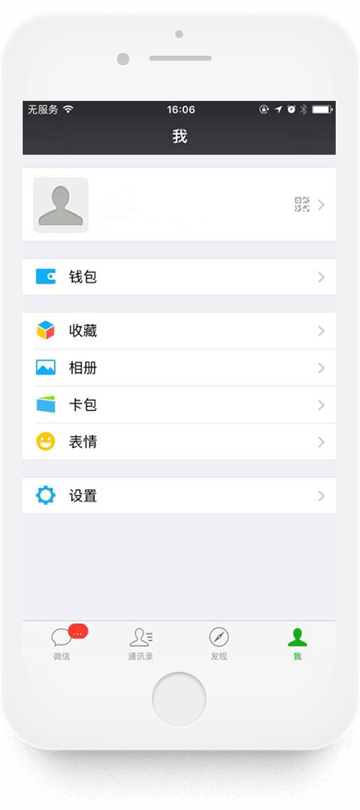
微信登陆后的主界面下方有“微信”、“通讯录”、“发现”和“我”四个按钮,通过这四个按钮的指引可以查询或修改相关信息。There are four keys at the bottom of WeChat login home page: “Chats”, “Contacts”, “Discover” and “Me”. A user can review and edit relevant information using these four keys.
1、查询聊天记录、发送和接收的文件1. Search Chat History、Files Sent and Received
点击“微信”,查询聊天记录、发送和接收的文件Click “Chats” to search chat history, files sent and received.
2、查询微信好友和验证信息2. Search WeChat Friends and Verification Requests
点击“通讯录”,查询微信好友和验证信息Click “Contacts” to search WeChat friends and verification requests.
3、查询朋友圈动态3. Search Moments
点击“发现” →“朋友圈”,查询朋友圈动态Click “Discover” and search Moments status in “Moments”
4、查询“摇一摇”相关消息4. Search “Shake” Messages
点击“发现”→“摇一摇”→右上角设置,查询打招呼的人、摇到的历史消息、摇一摇消息等Click “Discover”, select “Shake” and click the settings on the top right corner to search “Greetings“, history message in “Shake” and message received in “Shake”.
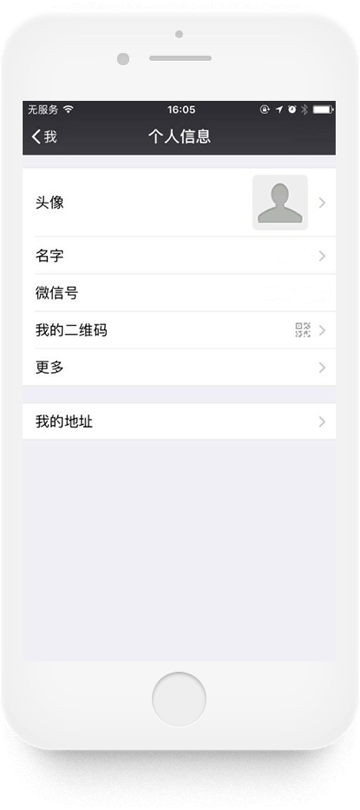
5、查询、修改微信头像、微信昵称、地址等个人信息5. Review and Edit WeChat Profile Photo, WeChat Nickname, Delivery Address and Other Personal Information
点击“我”→“个人信息”,查询微信头像、微信昵称、微信号、微信二维码及地址,并可修改头像、名字、我的地址等;点击“更多”,查询与修改性别、地区和个性签名Click “Me”, select “Personal Information” to search WeChat profile photo, WeChat nickname, WeChat ID, WeChat QR Code and delivery address. A user can also edit profile photo, nickname and delivery address. Other information such as gender, region and “What’s Up” can be reviewed and edited by clicking “More”.
6、查询、修改绑定手机号、微信密码、声音锁、应急联系人、最近登陆设备、绑定QQ号、邮箱6. Search and Edit Linked Phone Number, WeChat Password, Voiceprint, Emergency Contacts, Manage Devices, QQ ID and Email
点击“我”→“设置”→“账户与安全”,查询与修改绑定的手机号、微信密码、应急联系人、最近登陆设备、声音锁;点击“更多安全设置”,查询与修改绑定的QQ号和邮箱地址Click “Me”, select “Settings”, then click “Account Security” to review and edit Linked phone number, WeChat password, emergency contacts, manage devices and voiceprint. A user can further review and edit QQ ID and Email by selecting “More Settings”.
7、查询、修改绑定银行卡、支付密码、到账时间、账单7. Review and Edit Linked Bank Cards, Payment Password, Transfer Time and Bills
点击“我”,查询钱包、零钱、相册,并修改钱包内银行卡的绑定、支付密码及转账到账时间;点击“我”→ “钱包” → 右上角符号 → “账单”,查看您的账单Click “Me”, search Wallet, Balance and Photo Album and edit Linked bank cards, payment password and transfer time. You can review your transaction history by clicking “Me”, select “Wallet”, then click the key on the top right corner and choose “Transactions”.
8、查询本人的朋友圈动态8. Search Your Moments Status
点击“我”→“相册”,查询发布的朋友圈动态Click “Me”, then “My Posts” to search Moments posted.
分享Share
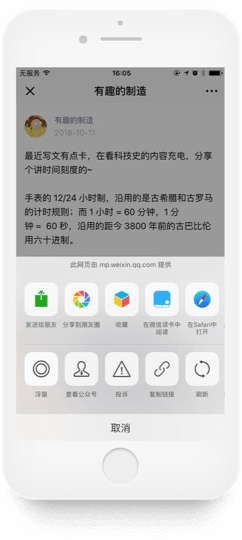
用户可以通过转发给特定好友或群聊以及分享至朋友圈两种方式实现信息的分享。A user can share information by forwarding it to a particular friend or a group chat or share it to Moments.
·发布朋友圈动态Post Moments
点击“发现”→朋友圈→拍摄按钮,可发布图片、文字或小视频等动态至朋友圈。Click “Discover”, select “Moments” and then click the video key to post photos, words, or videos in Moments.
·设置朋友圈权限、查看范围Set Moments View Permissions and Review Scopes
点击“通讯录”→某个微信好友→详细资料→右上角“· · ·”按钮→设置朋友圈权限,设置是否不让他(她)看我的朋友圈;Click “Contacts”, choose a particular WeChat friend, click details, then tap “· · ·” key on the top right corner to set Moments and Time Capsule Privacy ,deciding whether to hide your Moments posts from him/her;
点击“我”→设置→隐私,集中设置不让他(她)看我的朋友圈,设置允许朋友查看朋友圈的范围(可选择最近三天、最近半年或是全部),设置是否允许陌生人查看十条朋友圈。Click “Me”, select “Settings”, then tap “Privacy” to set Moments post view permissions uniformly and Viewable by Others (a user can select either last 3 days, last 6 months or all) and decide whether to make last 10 posts to public.
删除Delete
微信为用户删除个人信息提供了两大主要操作方式:WeChat provides two ways to delete personal information:
(1)“左滑”操作;(2)点击“删除”、“清除”、“清空”或“注销账号”操作。(1) “swiping left” and (2) clicking “delete”, “remove”, “clear” or “account cancellation”.
1、删除聊天记录、文件1. Delete Chat History and Chat Files
点击“微信”→微信好友或群聊的对话框,或“文件传输助手”,逐一左滑删除聊天记录或文件;Click “Chats”, select a WeChat friend or a WeChat group or a “File Transfer” and delete particular chat history or chat file by swiping to the left.
2、删除地址2. Delete Address
点击“我”→“个人信息”→“我的地址”,左滑删除地址信息;Click “Me”, select “My Profile”, choose “Region” and swipe left to delete address information.
3、删除交易信息3. Delete Transaction History
点击“我”→“钱包”→右上角图标→“账单”,左滑删除交易信息;Click “Me”, select “Wallet”, tap the key on the top right corner and choose “Bills”. Swipe left to delete transaction information.
4、删除声音锁、应急联系人、登陆设备信息4. Delete Voiceprint, Emergency Contacts and Manage Devices
点击“我”→“设置”→“账号与安全”→“声音锁”、“应急联系人”、“登录设备管理”,左滑删除相应信息;Click “Me”, select “Settings” and “Account Security”, choose “Voiceprint”, “Emergency Contacts” or “Manage Devices” and swipe left to remove corresponding contents.
5、删除“摇一摇”相关信息5. Delete Information in “Shake”
点击“发现”→”摇一摇→右上角设置→“摇到的历史”,左滑或点击右上角“清空”,删除摇一摇信息;Click “Discover”, select “Shake”, click the settings on the top right corner and then choose “Shake History”. Swipe left or click the “clear” on the top right corner to remove Shake information.
6、删除“附近的人”位置信息6. Delete Location Information in “People Nearby”
点击“发现”→“附近的人”→右上角“· · ·”按钮→“清除位置信息并退出”,删除位置信息(如未打开“附近的人”,可通过点击“我”→“设置”→“通用”→“发现页管理”→打开“附近的人”);Click “Discover”, select “People Nearby”, then click“· · ·”key on the top right corner and select “clear location information and log out” to remove location information. If “People Nearby” is off, you can turn on by clicking “Me”, “Settings” then choose “General”, “Manage Discover” to turn on “People Nearby”.
7、删除朋友圈动态7. Delete Moments Posts
点击“我”→相册,或“发现”→“朋友圈”选中要删除的动态,点击删除;Click “Me”, select “My Posts” or Click “Discover” and select the posts in “Moments” and remove by clicking “delete”.
8、注销账号8. Cancel Accounts
点击“我”→“设置”→“账户与安全“→”微信安全中心”→“注销账号”。Click “Me”, select “Settings” and “Account Security”, then choose “WeChat Security Center” and tap “Account Cancellation”.
注: 当你注销帐号后,我们将删除或匿名化处理你的信息,具体可参见《重要提醒》页面。Please note once your account is cancelled, we will delete or anonymize your information. Please refer to Important Notice for details.
《微信隐私保护指引》Weixin Privacy Protection Guideline
微信通过《微信隐私保护指引》,向用户阐述我们收集的信息、信息的存储、信息的安全、我们如何使用信息、对外提供、你的权利、变更、未成年人保护及联系我们等内容。Weixin Privacy Protection Guideline(“Guideline”) provides an explanation to how WeChat collects, uses, stores, secures, and shares a user’s personal information. This Guideline also informs a user her rights, amendments, protection of minors, and contact us.
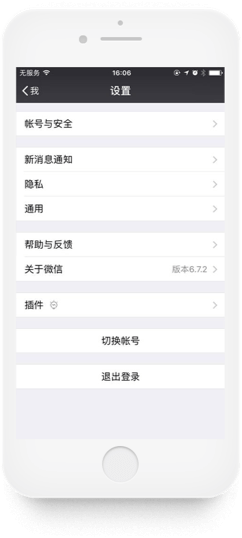
用户通过点击“我”→“设置”→“关于微信”,在界面下方可查询《微信隐私保护指引》。A user can search and review the Guideline by clicking “Me”, select “Settings”, tap “Privacy”, scroll down to the bottom and click “Terms and Privacy”.
微信安全中心WeChat Security Center
微信秉承“安全连接一切”的理念设置微信安全中心,用户通过微信安全中心可以解决找回账号密码、解封账号、冻结账号、解冻账号、投诉维权和注销账号等安全问题。We created WeChat Security Center implementing our principle of “Secure With Every Connection”. A user can recover WeChat account password, unblock an account, freeze an account, unfreeze an account, file complaints and cancel an account etc.
用户登录微信安全中心可以通过两种方式:A user can log in WeChat Security Center by ways of:
(1)在手机微信客户端中通过点击“我”→“设置”→“账户与安全“→”微信安全中心”;(1) Turn on WeChat, click “Me”, select “Settings”, tap “Account Security” and choose “WeChat Security Center”; or
(2)登录网页版微信安全中心。(2) log in WeChat Security Centerwebpage.
另外,微信提供“腾讯客服”官方公众号、腾讯客服”小程序、”腾讯举报受理中心”小程序及“帮助与反馈”,用户可通过以上途径自助查询和解决隐私相关问题。用户点击“微信”→“搜索”,或“发现“→“小程序”中搜索,输入小程序的名称即可获取相关小程序;点击我”→“设置”→“帮助与反馈”即可获取相关内容。WeChat also provides “Tencent Customer Service” WeChat official account, “Tencent Customer Service” mini program, “Tencent Reporting Center” mini program and “Help and Feedback”. A user can search and seek answers using these services. A user can retrieve relevant information by clicking “Chats” and tapping “Search” or clicking “Discover” and running a search of the program names in “mini programs” or clicking “Me”, selecting “Settings” and entering into “Help and Feedback”.


腾讯QQ是一款基于Internet的即时通信(IM)软件。目前已经覆盖Microsoft Windows、OS X、Android、iOS、Windows Phone等多种主流平台。腾讯QQ支持在线聊天、视频通话、点对点断点续传文件、共享文件、网络硬盘、QQ邮箱等多种功能,并可与多种通讯终端相连。Tencent QQ is an Internet based instant messaging (IM) software service which is widely available on Microsoft Windows, OS X, Android, iOS and Windows Phones. Tencent QQ offers features such as online chatting, video call, point to point file transfers with functions of transfer resuming after interruption, file sharing, cloud storage and QQ Email. It also enables the connections among varies types of terminal devices.
QQ为更好地保护用户隐私和信息安全,提供专门的隐私功能设置及帐户安全保障措施,为用户提供全方位的信息保护,用户可以查询、修改、分享和删除自己的信息。To better protect users’ privacy and information security, QQ provides designated privacy settings and account security measurements which enable a user to search, edit, share and delete her personal information.
管理信息Information Management
查询与修改Review and Edit
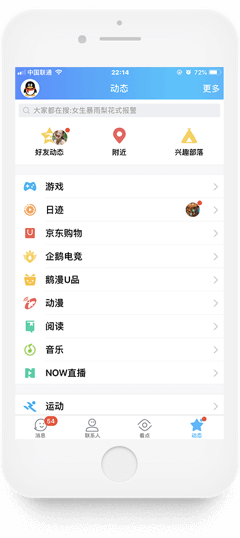
QQ登录后的主界面左上角和下方有“看点”、“消息”、“联系人”和“动态”四个按钮,通过这四个按钮的指引可以查询或修改相关信息。There are four keys at the top left corner and bottom of QQ login home page: “Higlights”, “Chats”, “Contacts” and “Status”. A user can review and edit personal information using these four keys.
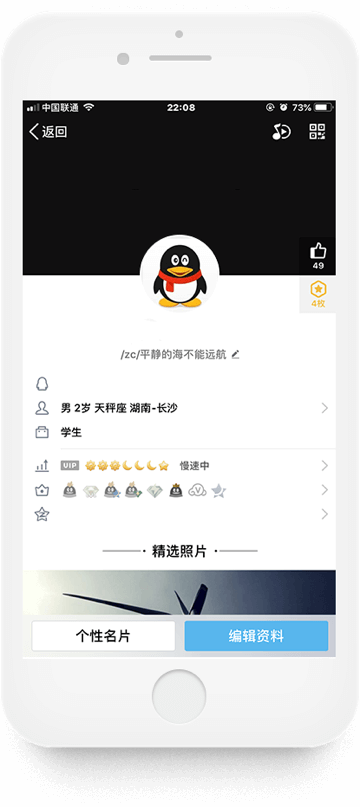
1、查询、修改头像、昵称、签名、性别、年龄、照片等信息1. Search, Edit Information such as Avatar, Nickname, What’s Up, Gender, Age, Photo etc.
点击左上角“头像”,查询头像、昵称、签名、QQ号、性别、等级、照片、年龄、个性标签、所在地、二维码等信息;Click “Avatar” on the top left corner to search avatar, nickname, what’s up, QQ ID, gender, QQ grade, photo, age, personal tag, region, QR code etc.;
2、查询账户、付款码、卡券等信息2. Search Account, Payment Code and Cards
点击头像→“钱包”,查询账户、付款码、卡券等;Click “Avatar”, select “Wallet” to review account, payment code, cards and etc.
3、查询、修改收货地址、支付密码、实名认证信息、手势密码等交易信息3. Search and Edit Shipping Address, Payment Password, Real-Name Authentication, Gesture Lock and other Transactional Information
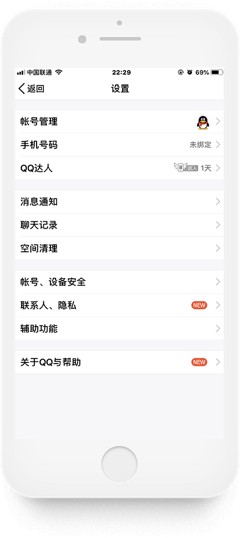
点击头像→左下角“设置”,查询交易记录、地址管理、实名认证信息等,同时可在此界面修改收货地址、实名认证信息、支付密码、钱包手势密码、指纹支付等;Click “Avatar” and select “settings” on the bottom left corner to review information including transaction history, address management and real-name authentication. A user can also edit shipping address, real-name authentication information, payment password, gesture lock, pay with Touch ID and etc.
4、查询收藏、相册、文件4. Search Favorites, Photo Album and Files
点击头像→“我的收藏”、“我的相册”、“我的文件”,查询相关信息;Click “Avatar”, then select “My Favorites”, “My Photo Album” and “My Files” to search relevant information
5、查询、修改帐号信息5. Search and Edit Account Information
点击头像→“设置”,查询或修改账号信息:账号管理(多个登录账号、关联QQ号)、绑定手机号码、账号、设备安全(密保手机号码、登录验证设备、当前在线、手势指纹)等;Click “Avatar”, select “Settings” to search and edit account information including: account management (multiple login accounts or associated QQ IDs), linked phone number, linked accounts, device security (password linked phone number, authentication device, on-line status, pattern and touch ID) and etc.
6、查询聊天记录、群消息、临时消息、服务号、公众号等6. Search Chatting History, Group Messages, Temporary Messages, Service Account, Official Account etc.
点击“消息”,查询聊天记录、群消息、临时消息、服务号、公众号、接收与发送的文件、功能推送等;Click “Chats” to search chatting history, group messages, temporary messages, service account, official account, received and sent files, push features etc.
7、查询好友、特别关心、群聊、设备、通讯录、好友动态、兴趣部落等7. Search Friends, Special Attention, Group Chats, Devices, Contacts, Friends’ Qzone Status, Hobby Groups and etc.
点击“联系人”,查询好友、特别关心、群聊、设备、通讯录、公众号等,点击”联系人”→“新朋友”,查询好友通知、好友推荐,点击”动态”,查询好友动态、附近、兴趣部落;Click “Contacts” to search friends, special attention, group charts, devices, contacts and official accounts. Click “Contacts” and select “New Friend” to search friend request, friend recommendations. Click “Status” to search friends’ status, nearby and hobby groups.
8、查询、修改开启的功能8. Search and Edit Features Turned On
点击“动态”→右上角“更多”,查询或修改开启的功能。Click “Status” and select “More” on the top right corner to search and edit features turned on.
分享Share
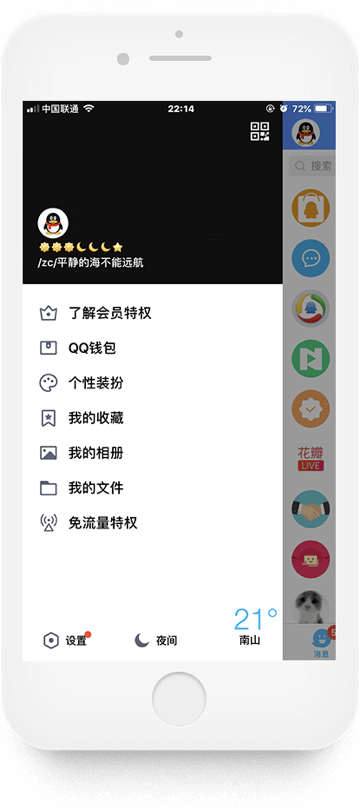
用户可以通过对“我的收藏”、“我的相册”、“我的文件”转发给特定好友或群聊以及分享至QQ空间两种方式实现分享。A user can share information by forwarding “My Favorite”, “My Photo Album”, or “My Files” to a particular friend or a group chart or share it to Qzone.
1. 点击左上角头像 →“我的收藏”/“我的相册”/“我的文件”→“转发”,对信息进行分享;1. Click “Avatar” on the top left corner, select “My Favorite” or “My Photo Album” or “My Files”, then tap “forward” to share the information;
2. 点击“动态”→“好友动态”→右上角添加,发布说说、图片和小视频等动态至QQ空间。2. Click “Status”, select “Friend Status” then click the “Add” key on the top right corner, share comments, photos and videos in Qzone.
删除Delete
QQ为用户删除个人信息提供了两大主要操作方式:QQ provided two ways to delete personal information:
(1)“左滑”操作;(2)点击“删除”或“清空”操作。同时,用户可以通过PC端了解相关账号的注销。(1) “swiping to the left” and (2) click “delete” or “clear”. A user can also access account cancellation information through QQ personal computer terminal.
1、删除基本信息1. Delete Basic Information
点击左上角头像,删除基本信息;Click “Avatar” on the top left corner to remove basic information.
2、删除收藏、相册、文件等信息2. Delete information such as “Favorites” “Photo Album” and “Files”
点击左上角头像,对“QQ钱包”、“我的收藏”、“我的相册”、“我的文件”中的内容左滑进行删除;Click “Avatar” on the top left corner, select “QQ Wallet (Click in Account)” or “My Favorite”, or “My Photo Album (as in Qzone)” or “My Files” and swipe to the left.
点击左上角头像 →“设置”→“账号、设备安全”,对账号和登录验证的设备等进行删除;Click “Avatar” on the top left corner, select “Settings”, then choose “Account and Device Security” to remove accounts and login authentication devices.
3、删除聊天记录、聊天文件3. Delete Chat History and Chat Files
点击左上角头像 →“设置”→“聊天记录”,对聊天记录进行“清空”;或点击“消息”,逐一左滑删除聊天记录或文件;Click “Avatar” on the top left corner, select “Settings” and choose “Chat History” to clear or Click “Messages” and remove relevant chat history or files by swiping to the left.
4、删除好友、好友通知/推荐、动态信息;关闭特别关心4. Delete Friends, Friend Requests, Friend Recommendations, Status Information and Cancel Special Attention.
点击“联系人”→某个QQ好友→关闭“特别关心”/删除好友;Click “Contacts”, select a particular QQ Friend and cancel “Special Attention” or delete friend;
点击“联系人”→“新朋友”,删除好友通知或好友推荐;Click “Contacts”, select “New Friend” to delete friend request or friend recommendation;
点击“动态”→“好友动态”删除动态信息。Click “Status”, select “Friend Status” to delete status information.
5、退出群聊、取消关注公众号5. Quit a Group Chat and Cancel Official Account Subscription
点击“联系人”→“群聊”→点击群→右上角图标 →右上角图标 ,退出群聊;Click “Contacts”, select “Group Charts”, choose the target group and click the key on the top right corner, then tap the key on the top right corner to quit from the group chat;
点击“联系人”→“公众号”→点入公众号→右上角图标 →右上角图标,取消关注。Click “Contacts”, select “Official Account”, tap the key on the top right corner after entering official account and click the key on the top right corner again to cancel the subscription.



隐私设置Privacy Settings
QQ为用户提供隐私功能设置,用户可通过点击左上角头像 →“设置”→“联系人、隐私”,设置如下内容:QQ offers its users the opportunity to manage her privacy by clicking “Avatar” on the top left corner, select “Settings” and choose “Contacts, Privacy”. A user can change privacy settings for the following features:
(1)绑定手机通讯录;(1) Linked Phone Contacts;
(2)加好友设置;(2) Friend Request Settings;
(3)好友动态设置;(3) Friend Status Settings;
(4)特别关心;(4) Special Attention; and
(5)不常用联系人等。(5) Inactive Contacts.
QQ安全中心QQ Security Center
QQ安全中心努力保护用户QQ安全,关键时刻及时提醒用户账号登录情况,用户可随时掌握账号安全动态、查看登录记录、修改密码、消费记录等,号码出现异地登录或风险时会主动提醒。QQ Security Center is dedicated to protect QQ security for our users and it provides users QQ login status during critical time. A user can check her QQ account security status, login history, update password, and review transaction history at any time. QQ Security Center also actively issues a warning when a QQ ID is logged in a different location or when there is other risks.
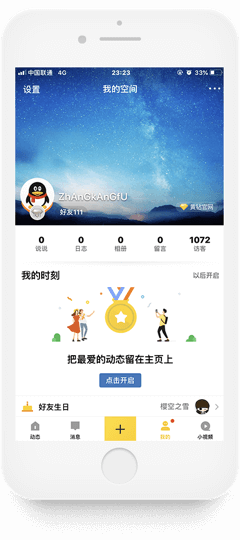
QQ空间是一个面向腾讯QQ用户的具有博客功能的网络社交平台。Qzone is a social networking blogging website provided by Tencent.
QQ空间为更好地保护用户隐私和信息安全,提供专门的隐私功能设置,确保用户在使用时不用担心信息的泄露,用户可以进行查询、修改、分享、删除自己的信息。Qzone provides its users designated privacy settings to better protect the users’ privacy and information security. A user can search, edit, share, and delete her information without worrying about unauthorized disclosure.
管理信息Information Management
查询与修改Review and Edit
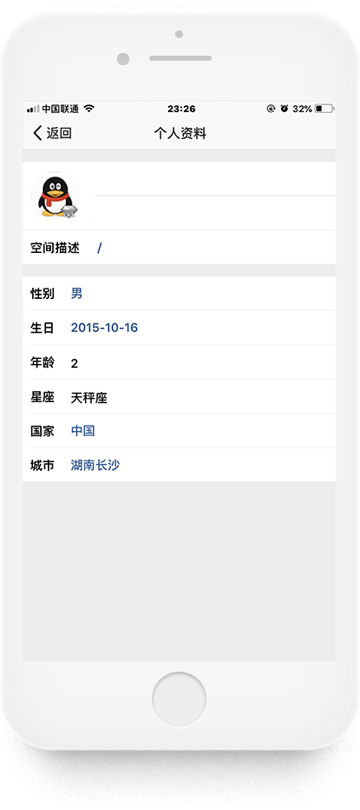
QQ空间登录后的主界面下方有“动态”、“消息”、“我的”和“小视频”四个按钮,通过“我的”按钮的指引可以查询或修改相关信息。There are four keys at the bottom of Qzone login homepage: ”status”, “message”, “me” and “short video”. A user can review and edit personal information using the “me” key.
1、查询、修改头像、QQ昵称、QQ号、性别、生日、年龄、星座、国家、城市等个人资料1. Search and Edit Personal Information such as: Avatar, QQ Nickname, QQ Number, Gender, Birthday, Age, Zodiac, Country and City, etc.
点击“我的”→“设置”→“个人资料”,查询与修改头像、QQ昵称、QQ号、性别、生日、年龄、星座、国家、城市;Click “Me”, select “Settings” then use “Personal Information” to review and edit information such as avatar, QQ nickname, QQ number, gender, birthday, age, birthday, zodiac, country and city;
2、查询、修改说说2. Review and Edit “Comments”
点击“我的”→“说说”,查询个人发送的说说,点击“
 ”,即可对其进行修改;Click “Me”, select “Comments” to review comments posted. A user can edit the
comments by clicking “”.
”,即可对其进行修改;Click “Me”, select “Comments” to review comments posted. A user can edit the
comments by clicking “”.3、查询、修改相册3. Review and Edit Photo Album
点击“我的”→“相册”,查询照片并修改相册的名称、更换封面、设置权限等;Click “Me”, select “Photo Album” to review and edit the name, profile photo and settings etc.
4、查询、修改日志和私密日记4. Review and Edit Journal and Private Diary
点击“我的”→“日志”,查询并修改已发表的日志以及私密日记;Click “Me”, select “Journal” to review and edit published journal and private diary.
5、查询留言5. Review Messages
点击“我的”→“留言”,查询留言板的留言;Click “Me”, select “Messages” to review messages.
6、查询访客记录6. Review Visitor History
点击“我的”→“访客”,查询访客记录。Click “Me”, select “Visitor” to review visitor history.
删除Delete
1、删除说说1. Delete Comments
点击“我的”→“说说”→“
”→“删除”,删除说说;Click “Me”, select “Comments”, then use “” and click “Delete”
to delete comments.2、删除相册、照片2. Delete Photo Album and Photos
点击“我的”→“相册”→点击进入要删除的相册→ “编辑相册”→“删除相册”,删除相册;Click “Me”, select “Album”, click and open the photo album to be deleted, select “Edit Photo Album”, and then click “Delete Photo Album” to remove the whole album.
点击“我的”→“相册”→点击进入要删除照片所在的相册→ “批量管理”→“删除”,删除照片;In order to delete individual photos, click “Me”, select “Album”, click and open the photo album where the photo is located, then click “Batch Management” and remove individual photos by clicking “Delete”.
3、删除日志3. Delete Journal
点击“我的”→“日志”→“摘要”→
→“删除”,删除日志;Click “Me”, select “Journal” and “Summary”, click “” and
apply “delete” to remove journal.4、删除留言4. Delete Messages
点击“我的”→“留言”→“
”→“删除”,删除留言;Click “Me”, select “messages”, click “”and “delete” to
remove messages.5、删除访客记录5. Delete Visitor History
点击“我的”→“访客”→“谁看过我”→“···”→“删除此访问记录”,删除访客记录 ;Click “Me”, select “Visitors” and “People Visited My Qzone”, then click “···”and choose “Delete this visiting history” to remove visitor history.
6、退出登录6. Log Out
点击“我的”→“设置”→“退出当前账号”,退出QQ空间的登录。Click “Me”, then “Settings” and select “Log Out” to log out Qzone.
隐私设置Privacy Settings
QQ空间为用户提供隐私功能设置,用户可以通过点击“我的”→“设置”→“权限隐私”,设置如下内容:Qzone offers a user the opportunity to manage her privacy – by clicking “Me”, “Settings” then select “Privacy Settings”. A user can change privacy settings for the following features:
(1)谁能看我的空间;(1) Who can see my Qzone;
(2)谁能看我的访客;(2) Who can see my visitors;
(3)谁能看我的生日信息;(3) Who can look up my birthday;
(4)屏蔽他的动态;(4) Block his status;
(5)访问设置(黄钻功能);(5) View Settings (Reserved for Yellow Diamond Users);
(6)屏蔽所有秘密;(6) Block all secrets;
(7)私密模式等。(7) Private mode etc.

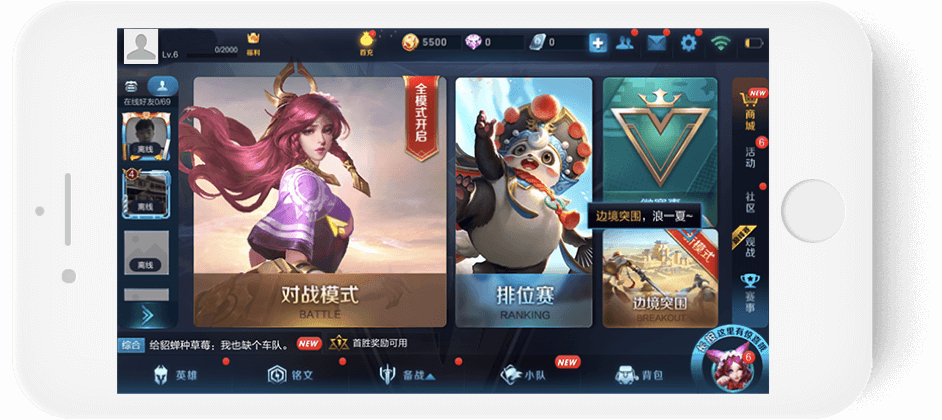
王者荣耀是一款5V5英雄公平对战手游,王者荣耀为更好地保护用户隐私和信息安全,多次更新用户隐私偏好的设置,为用户在游戏中的隐私信息提供全方位保护。用户可以查询、修改、分享和删除自己的信息。Arena of Valor is an epic 5v5 multiplayer online battle arena (MOBA) mobile game. To better protect users’ privacy and information security, and specifically the user’s private information that is used in the game, we frequently update our privacy settings to enable our users to review, edit, share and delete personal information.
管理信息Information Management
查询与修改Review and edit
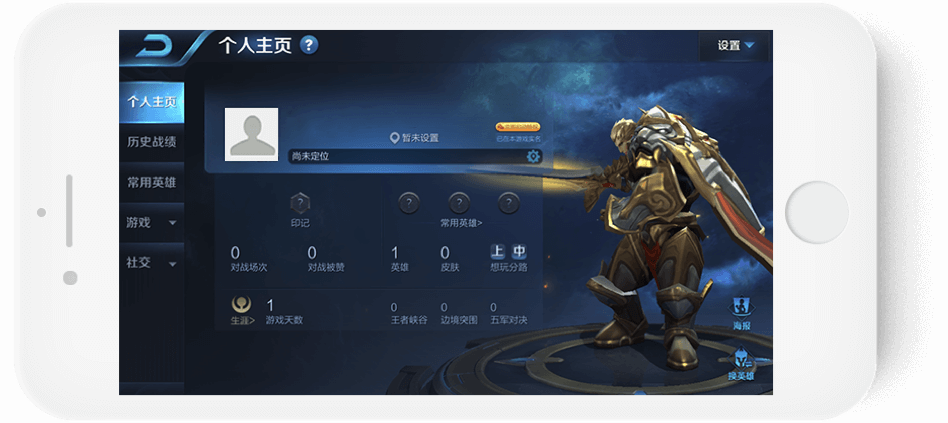
王者荣耀登录后的主界面上方有“头像”、“
 ”、“
”、“ ”和“
”和“ ”四个按钮,通过这四个按钮的指引可以查询或修改以下信息。After logging in the game, users can review and edit their information by tapping the
following four buttons on the homepage: “Avatar”, “”,“”and“”.
”四个按钮,通过这四个按钮的指引可以查询或修改以下信息。After logging in the game, users can review and edit their information by tapping the
following four buttons on the homepage: “Avatar”, “”,“”and“”.1、查询或修改头像、名字、战队名称等资料1. Review and Edit information of Avatar, nickname, team name and etc.
点击左上方“头像”,查询或修改头像、名字、战队名称、称号、当前等级、对战数据、荣誉资料、历史战绩、社交(擅长位置、所在地区、常在时段、我的标签、亲密关系、心愿单)等Tap “Avatar ”on the upper left corner to review and edit avatar, nickname, team name, titles, game levels, game play statistics, honors, game play history, network (such as preferred location, region, mostly online period, labels, relationships, wish list) and etc.
2、查询、修改基本资料2. Review and Edit Basic Information
点击左上方“头像”→“设置”,查询或修改头像、名字、战队名称、称号、当前等级、成就等级、奖杯等Tap “Avatar ” on the upper left corner, select option“Settings” to review or edit avatar, nickname, team name, titles, current level, achievement levels, trophies and etc.
3、查询对战资料3. Search Game Play Information
点击左上方“头像”→“游戏”→“对战资料”,查询对战数据Tap “Avatar ”on the upper left corner, choose option “Game” and select “Game Play Information” to search game play statistics.
4、查询荣誉资料4. Search Honor Information
点击左上方“头像”→“游戏”→“荣誉资料”,查询荣誉资料Tap “Avatar ”on the upper left corner, choose option “Game” and select “Honor Information” to search honor information.
5、查询历史战绩5. Search Game Play History
点击左上方“头像”→“历史战绩”,查询历史战绩Tap “Avatar ”on the upper left corner, and select option “Game Play History” to search history of game play information.
6、查询或修改交友名片6. Search or Edit Friend List
点击左上方“头像”→“社交”,查询或修改交友名片Tap “Avatar ”on the upper left corner, and select “Network” to search or edit friend making name card.
7、查询亲密关系7. Search Relationships
点击左上方“头像”→“亲密关系”,查询亲密关系Tap “Avatar ”on the upper left corner, and select option “Relationships” to search relationship information.
8、查询微信好友、游戏好友、附近的人、师徒、黑名单8. Search WeChat Friend, Game Friend, People Nearby, Master-Apprentices, Blacklist
点击“
”,查询微信好友、游戏好友、附近的人、师徒和黑名单Click button “”
to search WeChat friends, game friends, people nearby, master-apprentices and blacklist.9、查询好友邮件、系统邮件、消息中心、礼物中心9. Search Friend Email, System Email, Message Center and Gift Center
点击“
”,查询好友邮件、系统邮件、消息中心和礼物中心Click button “”
to search email from friends, system email, message center and gift center information.
分享Share
用户可以通过转发给特定好友或群聊以及分享至朋友圈两种方式实现个人信息的分享。Users can share personal information by forwarding it to a WeChat friend, a WeChat group or WeChat Moment by tapping “Avatar ”on the upper left corner, choose option “Game”, and select “Game Play Information”, tap “Share” to share the game play information.
点击左上角“头像”→“游戏”→“对战资料”→“分享”,分享对战资料。
删除Delete
1、删除游戏好友、师徒、亲密关系1. Delete Game Friend, Master-Apprentices and Relationships
用户可以通过点击“
”→游戏好友→“ ”进行删除;Click button “”,
and select “Game Friend”, then tap “”to
delete;
”进行删除;Click button “”,
and select “Game Friend”, then tap “”to
delete;点击“
”→“师徒”→“”进行删除;Click button “”,
and select “Master-Apprentices”, then tap button “”to
delete;点击“
”→游戏好友→右下角“亲密关系”进行关系解除。Click button “”,
and select “Game Friend”, then tap option “Relationships” on the lower right corner to remove a friend.2、取消屏蔽好友2. Unblock A Friend
点击“
”→游戏好友→左下角“黑名单”→“取消屏蔽”;Tap button “”,
and select option “Game Friend”, then tap “Black List” on the lower left corner and select “Unblock”.3、删除邮件3. Delete A Message
点击“
”对想要删除的内容进行快速删除或单项删除。Tap button “”,
and then you can proceed to fast delete or individual delete.

隐私设置Privacy Settings
用户可通过点击“”→“基础设置”→“隐私设置”,设置如下内容:Users can edit privacy settings by tapping button “”, select option
“Basic Settings”, then choose “Privacy Settings” to do the modification, which include:
(1)允许观战;(1) Allow Audience;
(2)贵族显示;(2) Display Membership Titles;
(3)允许预约;(3) Allow Appointment;
(4)综合频道队伍;(4) General Channel Team;
(5)亲密关系显示;(5) Display Relationship;
(6)发送语音消息;(6) Send Audio Message;
(7)荣耀称号显示;(7) Display Hero Titles;
(8)最近游戏组队;(8) Most Recent Game Play Team;
(9)大头像显示;(9) Display Avatar;
(10)战绩显示;(10) Display Scores;
(11)常用职业显示;(11) Display Frequent Occupations;
(12)招募队友组队。(12) Recruit Teammates.
此外,用户还可以对在线状态进行选择,包括:在线、勿扰与隐身。Users can also select their online status such as on-line, busy or invisible.
《Privacy Policy》(隐私政策)Privacy Policy
王者荣耀通过《Privacy Policy》及相关协议向用户阐述信息的收集、存储、安全、使用、对外提供的规则,同时告知用户对信息进行查询、变更、删除的权利,并对未成年人的信息保护进行了说明。Privacy Policy of Arena of Valor, together with other related agreements, provides users with our practices of personal information collection, storage, security, using and sharing with third parties. This Privacy Policy also informs users their rights of searching, editing, and deleting personal information, and has provided guidance regarding to our protection of minors’ personal information.
用户可以通过点击“”→“基础设置”→下方界面“隐私策略”,查询《Privacy
Policy》及相关协议中的内容。Users can search and review the Privacy Policy and other related agreements by tapping
the button “”,
select “Basic Settings” and tap option “Privacy Policy” at the bottom of the page.
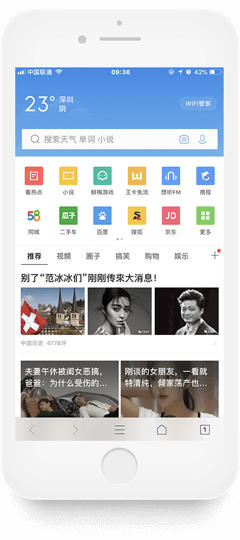
QQ浏览器作为一款快速、稳定、安全、网络化的优质浏览器应用,始终把保护用户的隐私及信息安全作为服务的重要内容。QQ Browser provides a user fast, stable, secured Internet browsing experience. It is QQ Browser’s key responsibility to protect users’ privacy and information security.
QQ浏览器不断完善安全技术和程序,在提高用户隐私保护和信息安全的保障水平的同时,为用户提供更安全、高质、便捷的服务。QQ Browser continues improving its security technology and program to provide its users a more secured, high-quality and convenient service and higher standard of privacy and information security protection.
管理信息Information Management
查询与修改Review and edit
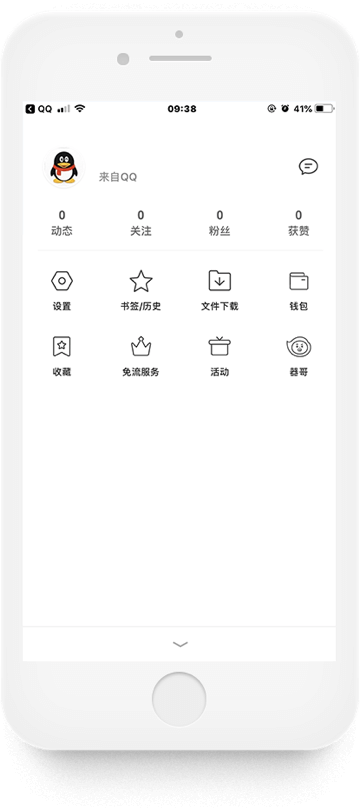
1、查询、钱包、收藏、关注、动态等1. Review Wallet, Favorite, Subscriptions, Trend etc.
点击中间菜单键“
 ”→“头像”,在个人中心查询、钱包、收藏、关注、动态。Click the menu key in the middle “”, then select “Avatar”,
search wallet, favorite, subscriptions and trend in personal center.
”→“头像”,在个人中心查询、钱包、收藏、关注、动态。Click the menu key in the middle “”, then select “Avatar”,
search wallet, favorite, subscriptions and trend in personal center.2、查询与修改生日、地区、性别、好友2. Review and Edit Birthday, Region, Gender, Friends
点击中间菜单键“
”→“头像”→“头像”,查询生日、地区、性别、好友,并可修改生日、地区、性别。Click the menu key in the middle “”, then select “Avatar” to
search and edit birthday, region, gender etc.3、查询Q米、书豆、充值记录、购买记录3. Search the Deposit and Purchase Records for Q Mi and Shudou (Both Q Mi and Shudou are virtual currencies on QQ Browser)
点击中间菜单键“
”→“头像”→“钱包”,查询Q米、书豆、充值记录、购买记录。Click the menu key in the middle “”, then select “Avatar”,
click “Wallet” to search deposit and purchase records for Q Mi and Shudou.4、查询书签、访问历史、下载文件4. Search Bookmarks, Website Visit History and Downloaded Files
点击中间菜单键“
”→“书签/历史”、“文件下载”,查询书签/访问的历史、最近下载。点击“最近下载”,还可查询微信文件、QQ文件、手机存储、私密空间、图片、视频、文档、音乐、安装包、压缩包、离线网页
、微云文件、百度云文件、云空间、其他。Click the menu key in the middle “”, select “Bookmark/History”
or “Downloads” to search bookmarks, website visit history, recent downloads. You can also search WeChat
folders, QQ folders, mobile storage, private space, pictures, videos, files, music, installation
package, compressed package, offline webpage, files stored in Tencent Cloud, Baidu Cloud or Cloud space
etc.
删除Delete
1、删除书签1. Delete Bookmarks
用户可以通过点击中间菜单键“
”→“书签”→“编辑”→选定对象→“删除”,删除选定的书签;Click the menu key in the middle “”, select “Bookmark”, click
“Edit”, then select the target and click “delete” to remove selected bookmarks.2、删除访问历史2. Delete Website Visit History
点击中间菜单键“
”→点击
“书签/历史”→“清空”,清空访问的历史;Click the menu key in the middle “”, choose
“Bookmark/History”, then click “Delete” to remove all website visit history.3、删除输入记录、历史记录、账号密码、缓存文件、cookies等数据3. Delete Input History, History Record, Accounts and Passwords, Caches, Cookies etc.
点击中间菜单键“
”→“设置”→“清除数据”,→可选择“输入记录、历史记录、账号密码、缓存文件、Cookies、视频、文档浏览记录、小说临时缓存、漫画临时缓存“→“清除数据”,进行相关数据的清除;Click the menu key in the middle “”, select “Settings”, click
“Data Removal” to select the data to be removed by clicking either “Input History”, “History Record”,
“Accounts and Passwords”, “Caches”, “Cookies”, “Videos”, “File Browsing History”, “Temporary Cache for
Novels” and/or “Temporary Cache for Cartoons”.4、退出登录4. Log Out
点击中间菜单键“
”→“头像”→“退出登录”,退出登录。Click the menu key in the middle “”, select “Avatar”, click
“Log Out” to sign out.
隐私设置Privacy Settings
(1)设置地区保密(1)Hide Your Location
点击中间菜单键“
”→“头像’
→”头像” →“地区”→“保密”,设置地区保密;Click the menu key in the middle “”, select “Avatar”, click
“Location” and choose “Hide” to hide your location.(2)设置无痕浏览(2)Private Browsing
点击中间菜单键“
”→“无痕浏览”,设置无痕浏览模式。“无痕浏览”不会记录你的上网浏览痕迹、历史记录及cookies等数据,保护你的个人隐私;Click the menu key in the middle “”, select “Browse In
Private” to enable the function. QQ Browser will not maintain your browsing history, history records,
cookies and other data to better protect your privacy.此外,如果你在使用QQ浏览器的过程中有任何疑问,欢迎点击中间菜单键“
”→“设置“→“帮助与反馈”,向我们咨询。If you have any questions during your use of QQ Browser, feel free to click the
menu key in the middle “”,
select “Settings” and send us your questions by clicking “Help and Feedback”.

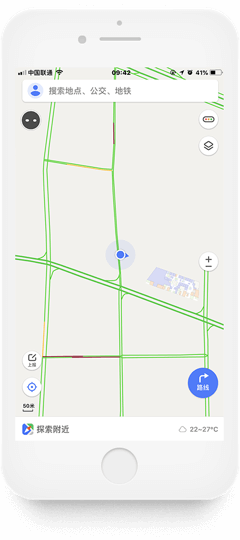
腾讯地图运用安全技术和程序建立完善的管理制度,保障用户信息的安全,避免用户信息遭受未经授权的收集、使用或披露。Tencent Maps uses security technologies and programs to set up a comprehensive management system to secure users’ personal information, in order to prevent from unauthorized collecting, using and disclosing.
为更好地保护用户隐私和信息安全,腾讯地图提供专门的隐私功能设置和信息管理功能。To better protect users’ privacy and personal information, Tencent Maps offers specific privacy setting and information management features.
管理信息Information Management
查询与修改Review and edit
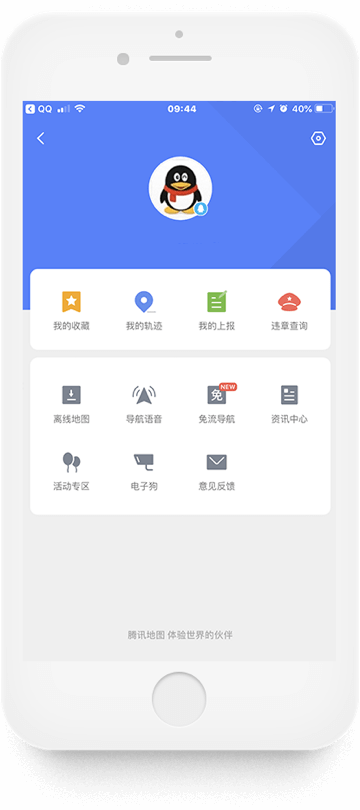
1、查询头像1. Review your avatar
点击左上角头像进行登录,查询头像;Tap “Avatar”on the upper left to review your avatar
2、查询与修改家、公司、收藏地址2. Review and edit home, working and saved addresses
点击左上角头像 →“我的收藏”,查询设置个人收藏夹中家、公司或者收藏地点的地址,Tap “Avatar” on the upper left, select option “My Places” to review home, working or other saved addresses.
点击“编辑”对家、公司、收藏地址进行修改;Click option “Edit“ to edit home, working or other saved addresses.
3、查询我的轨迹3. Search My Location History
点击左上角头像 →“我的轨迹”,查询我的轨迹;Tap “Avatar”on the upper left, select “My Location History” to review your location history.
4、查询离线地图4. Search Offline Maps
点击左上角头像 →“离线地图”,查询已下载的离线地图;Tap “Avatar”on the upper left, select “Offline maps” to review your saved offline maps.
5、查询违章情况5. Search Traffic Violations
点击左上角头像 →“违章查询”,查询违章情况。Tap “Avatar”on the upper left, select “Search Traffic Violations” to review your traffic violations.
删除Delete
1、删除家、公司、收藏地址1. Delete Home, Working and Saved Addresses
点击左上角头像→“我的收藏”,删除个人收藏夹中家、公司或者收藏地点的地址;Tap “Avatar”on the upper left, select “My Favorite” to delete home, working or other saved addresses.
2、删除离线地图2. Delete Offline Maps
点击左上角头像 →“离线地图”→“左滑删除已下载的地图”,删除已下载的离线地图;Tap “Avatar”on the upper left, select “Swipe Left to Delete Offline Maps”to remove saved offline maps.
3、删除搜索记录3. Delete Search History
点击“主页的搜索”→“清除历史记录”,清空所有的搜索记录;Tap “Homepage Search History”, click “Clear Browsing History” to delete all search history.
4、退出帐号4. Sign out
点击左上角头像 →“右上角图标”,退出账号。Tap “Avatar”on the upper left, select “Avatar” on the upper right to sign out your account.

隐私声明Privacy Statement
通过点击左上角头像 →“右上角图标”→“关于地图”→“隐私声明”,用户可在界面下方查询《隐私声明》。《隐私声明》告诉用户腾讯地图收集、使用、处理用户信息等基本规定。Users can find and review Privacy Statement by tapping “Avatar”on the upper left corner, and tap the “key” on the upper right corner, then tap “About Tencent Maps”, it will lead to “Privacy Statement”. The Privacy Statement provides users with information of how Tencent Maps collects, uses and processes users’ information.
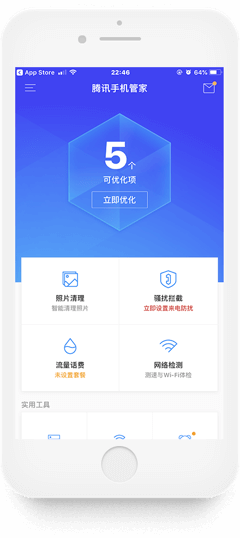
腾讯手机管家是移动端的一道用户信息安全防线,具有强大的骚扰拦截、病毒查杀等功能,查杀窃取隐私类的木马病毒、钓鱼网址,为用户的隐私信息安全保驾护航。Tencent WeSecure App provides a shield of information security protection for users’ portable devices. It is effective in protecting users’ private information by blocking spams, scanning viruses, locating and removing Trojans and fishing sites that evade users’ privacy.
手机管家为了更好地保护用户隐私和信息安全,提供了“骚扰拦截”等隐私功能设置,用户可以查询、修改、删除自己的信息。To better protect users’ privacy and information security, WeSecure App provides privacy setting features such as “Spam Blocking” and other functions, users can easily review, edit and remove their information.
管理信息Information Management
查询与修改Review and edit
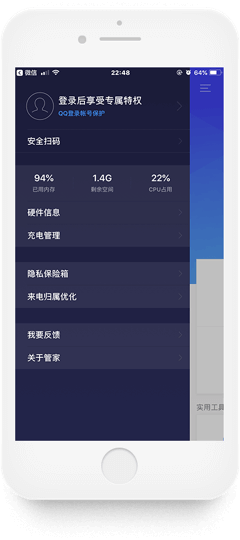
1、查询头像、昵称1. Review your avatar and your alias
点击左上角菜单键“
”→“头像”,查询头像、昵称;Tap the button “”
in the menu on the upper left corner, select “Avatar” to review your avatar and your alias2、查询、修改绑定的手机号、微信号、QQ号2. Review and edit the linked mobile number, WeChat ID and QQ number
点击左上角菜单键“
”→“头像”→“账号管理”,查询并修改绑定的手机号、微信号、QQ号。Tap the button “”
in the menu on the upper left corner, select “Avatar”, then select “Account Management“ to review and
edit your linked mobile number, WeChat ID and QQ number.
删除Delete
用户可以通过点击左上角菜单键“
”→“头像”→“账号管理”,清除手机管家与所绑定账号之间的相关数据。Tap the button “”
in the menu on the upper left corner, select “Avatar”, then select “Account Management“ to delete any
personal information stored in WeSecure App that is received from the linked accounts.

隐私设置Privacy Settings
1、骚扰拦截1. Spam Blocking
点击“骚扰拦截”,对骚扰电话和短信进行拦截;Tap “Spam Blocking” to block crank calls and messages
2、相册加密2. Photo Encryption
点击左上角头像或“右滑”页面→“隐私保险箱”→“设置密码”,对相册进行加密;Tap “Avatar” on the upper left corner or swipe the page to the right, select option “Privacy Safe Box”, then select option “Set Password” to encrypt your photos.
3、安全扫码、来电归属优化3. Secure QR Code Scanning and Caller ID Optimization
用户登录手机管家,可使用“安全扫码”、“来电归属优化”功能,保护个人隐私和信息安全。WeSecure App users can use “Secure QR Code Scanning” and “Caller ID Optimization“ settings to protect their privacy.
管理信息Information Management
查询与修改Review and Edit
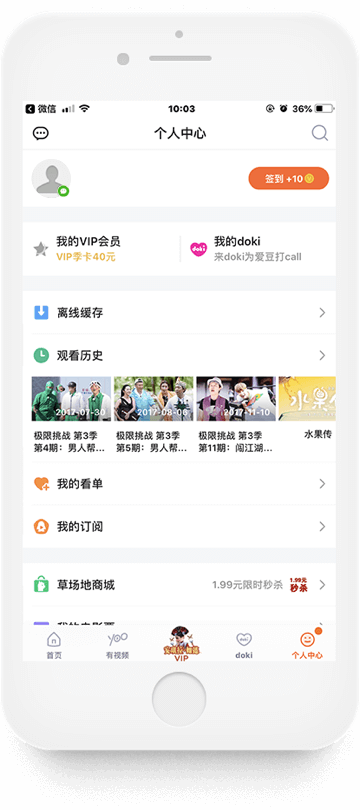
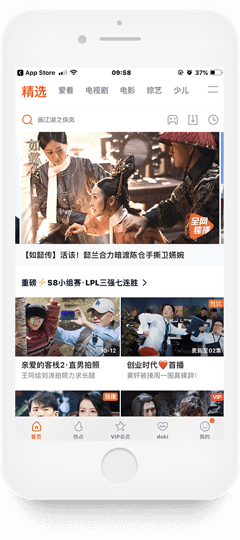
腾讯视频登录后的主界面下方有“首页”、“热点”、“VIP会员”、“doki”和“我的”五个按钮,通过其中四个按钮的指引可以查询相关信息。After logging into Tencent Video, users can find five buttons at the bottom of the Homepage, which are “Homepage”, “Popular”, “VIP Member”, “doki” and “Me”. You can review your personal information by using four of the five buttons.
1、查询离线缓存、继续观看、全部历史1. Search Offline Cache, Resume Watching and View All History
用户可以通过点击“首页”相关图标,查询离线缓存、继续观看、全部历史;Users can search offline cache, resume watching and view all history by tapping option “Homepage”.
2、查询会员消息、消息列别2. Search Member Messages, and Message List
点击“VIP会员”→左上角头像,查询会员信息和消息列表;Tapping “VIP Members”, and select “Avatar” on the upper left corner to search membership information and message list.
3、查询消息、私信以及关注的明星3. Search Messages, Private Messages and “My Stars”
用户可以通过点击“doki”,查询消息、私信以及关注的明星;Users can search messages, private messages and the “stars” by tapping “doki”.
4、查询个人基本信息4. Search Personal Information
点击“我的”,查询个人基本信息(昵称、加入的doki、关注、粉丝、会员信息、徽章、动态、视频、小视频、我的doki)、离线缓存、观看历史、我的看单、我的订阅以及消息和私信。Tapping button “Me”, to search personal information (nickname, subscribed doki, subscriptions, fans, membership information, badges, trends, videos, short videos, my doki), offline cache, view history, my view list, my subscription, messages and private messages.
分享Share
用户可以通过转发及发布动态这两种方式实现个人信息的分享。Users can share personal information by forwarding it to a friend or by posting status.
点击“热点”中的视频或正在观看的视频可进行转发分享;Users can choose a video in option “Popular ” or any streaming video, and forward it to friends.
点击“doki”,可发布图片、文字等动态至doki。Users can also tap button “doki” to post images, words and other status on doki.
删除Delete
腾讯视频为用户删除个人信息提供了两大主要操作方式:(1)“左滑”操作;(2)点击“删除”。Tencent Video provides users two methods to delete personal information: (1) swiping left and (2) tapping “delete”.
1、删除doki动态1. Delete Doki Status
用户可以通过点击“doki”→“
 ”按钮,删除doki动态;Users can tap button “doki”, select button “”to delete doki
status;
”按钮,删除doki动态;Users can tap button “doki”, select button “”to delete doki
status;2、删除观看历史、我的看单、私信2. Delete View History, My Watch List and Private Messages
点击“我的”,对观看历史、我的看单及私信通过左滑或点击“删除”进行删除。Tapping “Me”, to delete view history, my watch list and private messages by swiping left or tapping button“delete”.

 ”按钮,删除doki动态;
腾讯视频隐私保护指引Tencent Video Privacy Protection Guidelines
腾讯视频通过《腾讯视频隐私保护指引》,向用户阐述我们收集的信息、信息的存储、信息的安全、我们如何使用信息、对外提供、你的权利、变更、未成年人保护、其他及联系我们等内容。用户通过点击“我的” → “设置” → “腾讯视频隐私保护指引”,了解、查看相关内容。Tencent Video Privacy Protection Guidelinesprovides users with the information of our practices of personal information collection, storage, security, using and sharing with third parties. This Privacy Guidelines also informs users details of their rights, and updates, information of minor protection, and our contact information. Users can search and review the Privacy Guidelines by Tapping option “Me”, select “Settings” and tap “Tencent Video Privacy Protection Guidelines”.
【一】QQ软件如何设置隐私?1. How to manage privacy setting in QQ?
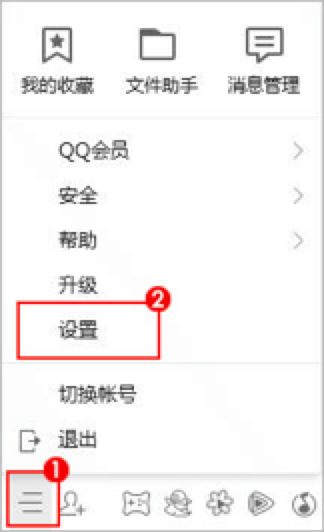
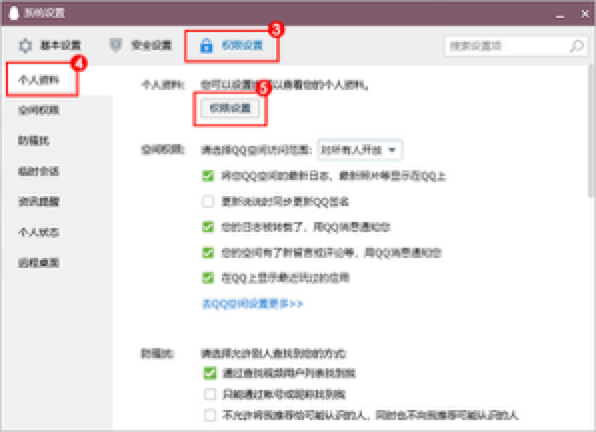
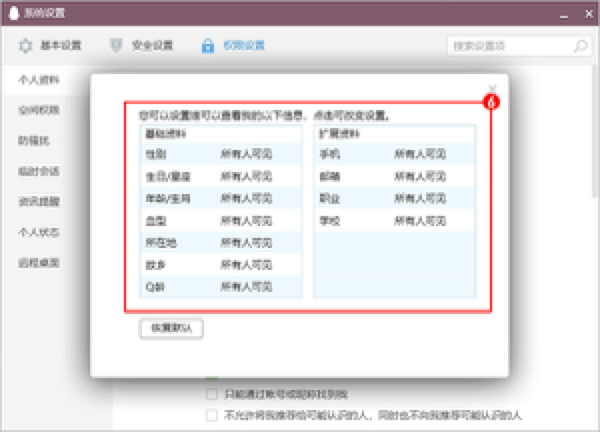
进入QQ软件【打开系统设置】 -> 【权限设置】 -> 【个人资料】 -> 【权限设置】,根据您的情况进行设置。Login QQ, click “System Settings” -> “Permission Settings” -> “My Profile” -> “Permission Settings” and adjust privacy settings according to your needs.
【二】怎么修改/找回QQ密码?2. How to update/retrieve QQ password?
【三】手机丢失,如何避免手机QQ和邮箱个人信息不外泄?3. How to avoid personal information in QQ and QQmail from leaking when your phone is lost?
手机丢了,不要惊慌,两步帮您快速阻止隐私泄漏:Don’t panic if you lost your cellphone. Take following two steps to prevent exposing your privacy:
第一步、紧急冻结QQ、微信Step 1: Lock QQ and WeChat Accounts
访问腾讯110紧急冻结QQ、微信帐号、有效避免他人登录对QQ、微信帐号恶意操作。Visit Tencent 110 to emergently lock QQ and WeChat accounts to effectively avoid any possible malicious actions by a third party.
第二步、修改QQ密码Step 2: Update QQ password
访问QQ安全中心,修改QQ密码,所有使用QQ登录的服务都会退出登录。Visit QQ Security Center to update QQ password. All related services that login via QQ account will automatically log out.
网址:http://aq.qq.com/gmLink: http://aq.qq.com/gm
如果您不在电脑旁,使用手机访问这个网址也可以改密。You can also visit QQ Security Center via a mobile browser if personal computer is not available.
做完这两步,您的QQ、微信就安全了。如果您还担心手机上的通讯录、短信、网银等隐私泄漏,建议远程擦除手机数据。Your QQ and WeChat accounts will be secured after completing the above-mentioned two steps. You can also erase cellphone data including contacts, text messages, on-line banking and etc. remotely to prevent the disclosure of private information on your phone.
iPhone手机:使用“查找我的iPhone”擦除手机数据。使用方法: http://help.apple.com/icloud/?lang=zh-cn#/mm6b1aa045iPhone: use “Search my iPhone” function to erase cellphone data. Method: http://help.apple.com/icloud/?lang=zh-cn#/mm6b1aa045
Android手机:使用手机管家等安全软件擦除手机数据。使用方法:http://m.qq.com/anti_theft/login.jspAndroid: use mobile security manager or other security applications to erase cellphone data. Method: http://m.qq.com/anti_theft/login.jsp
最后,请尽快到营业厅补办SIM卡,避免他人利用手机号进行诈骗或者接收您的短信。Please apply for a replacement SIM card from your carrier as soon as possible to prevent others from conducting fraudulent activities using your cellphone number or receiving your text messages.
【四】怎样开启/关闭QQ登录保护?4. How to turn on/off QQ login protection?
开启方法:Turn on:
手机QQ:Mobile QQ:
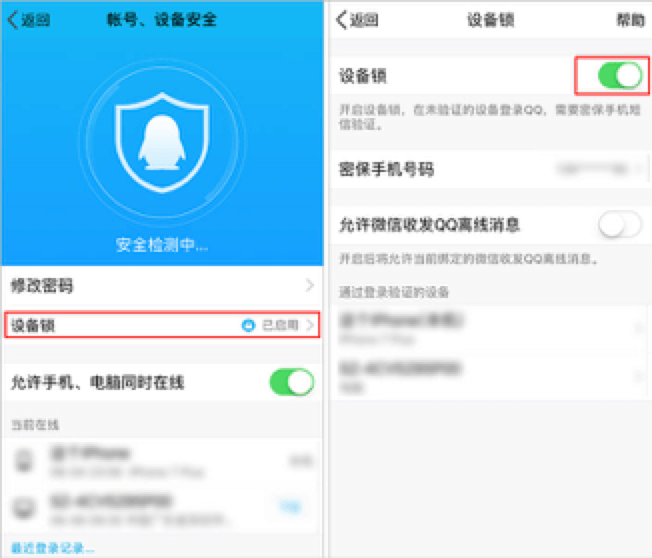
登录手机QQ -> 设置 -> 设备锁、帐号安全 -> 设备锁 -> 开启保护 -> 确认开启,确认手机号码是自己常用号码后选择确认手机号码 -> 输入验证码 -> Login mobile QQ -> Settings -> Device Lock and Account Security -> Device Lock -> Turn on-> Confirm it has been turned on and confirm the mobile number after verifying that it is your common phone number -> Type in verification code -> Turn on successfully.
成功开启保护;
验证成功后,QQ登录保护就开启成功了,在这台手机上登录只需验证密码,在其他手机上登录就需要验证密码和短信验证码了;After verification, QQ login protection is successfully turned on. You only need to type in verification code while logging in QQ on this phone, but you need to type in both password and text message verification code if logging in on another portable device.
QQ安全中心手机APP:QQ Security Center Mobile App:
QQ安全中心手机APP -> 密保工具 -> QQ保护;QQ Security Center Mobile App -> Password Protection Tool -> QQ Protection;
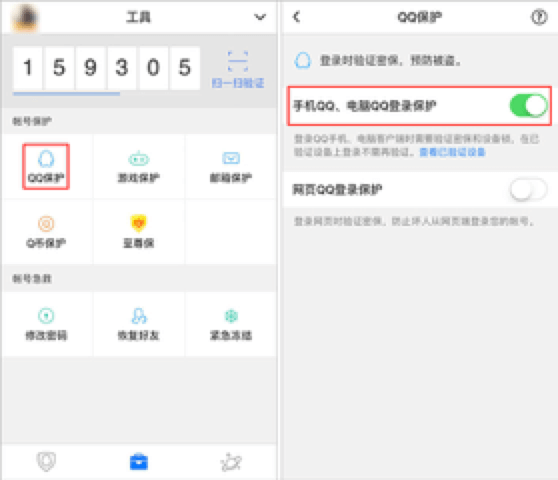
【五】如何保护自己的QQ号码安全?5. How to protect your QQ ID?
简单的讲,QQ使用安全 = 使用安全的电脑 + 安全的上网习惯 + 设置QQ密码保护。Briefly speaking, the QQ security = using secured personal computer + good online surfing habit + setting QQ password protection.
1、使用安全的电脑:1. Using Secured Personal Computer:
1)安全的使用QQ软件,首先依赖于用户在一台安全的电脑上网。1) First thing first, a user needs to use a secured personal computer to go online for using QQ safely.
2)对于他人或公共电脑:您应该先询问电脑是否足够安全,检查是否安装了杀毒软件并使用最新的病毒特征库,确认电脑安全后再使用。2) If you are using others’ or public computer: before using the computer, verify that whether the computer is secured, whether it has installed antivirus software and updated most recent virus database.
2、养成安全的上网习惯:2. Good Online Surfing Habit:
养成良好的上网习惯将有助于您远离计算机流行病毒、网络欺诈陷阱等各种危害。这些习惯主要包括:Good online surfing habit will benefit you to stay away from computer virus, Internet fraud and etc. Good online surfing habit includes:
1)不要使用非官方发布的QQ版本,尽量使用最新版本的QQ软件;1) Avoid using unauthorized version QQ, and use the most recently updated version QQ software;
2)不在非腾讯官方的网站(或软件)中输入QQ帐号和密码;如何识别腾讯官方网站地址;2) Avoid entering QQ ID and QQ password on websites and in software other than Tencent’s official website/software; how to recognize the Tencent official website URLs;
3)不要轻易打开网络下载或网友传送的文件,确需打开前应进行病毒扫描;3) Doing a virus scan before opening any files downloaded from the Internet or received from others on the Internet;
4)不要访问陌生人发来的安全性未知的网址;4) Avoid visiting links with unknown security status which is shared by a stranger;
5)定期修改QQ密码。5) Regularly update QQ password.
3、设置QQ密码保护:3. Set QQ Password Protection:
密码保护资料是用户拥有QQ帐号的重要凭证,它能够帮助您更快捷的找回QQ密码,还支持在进行重要操作(如修改密码)前验证用户身份,因此,密码保护能够很大程度的提升QQ帐号的安全性。Password protection files is the important evident to prove the ownership of users’ QQ account. You can use it to retrieve QQ password conveniently, and process user ID verification before conducting important changes (such as updating a password). Thus, password protection can greatly enhance the security of your QQ account.
为了确保QQ的使用安全,用户应该为帐号设置完整的密码保护资料,可登录QQ安全中心设置密保。此外,QQ安全中心将使用各种安全策略和技术手段实时保护用户的帐号安全。For the security of using QQ, a user should create a complete password protection file by logging into QQ Security Center. QQ Security Center also provides various security protection strategies and technical solutions for real-time protection of your QQ ID security.
登录QQ时,密码框防盗技术、软键盘、查杀木马可用于提高输入密码的安全性,登录QQ后,QQ的实时安全防护、传文件保护、网址安全提示等可为您提供无处不在的保护。Password-entering anti-theft technology, soft keyboard and trojan detecting can be used to improve the security level of password entering while logging into QQ. Real-time security protection, file transferring protection, URL security reminder and other features will offer you a comprehensive protection.
4、下载安全QQ安全中心手机版:4. Download and Install QQ Security Center Mobile Version:
如果您有智能手机,建议在手机上下载安装QQ安全中心手机版。可以享受游戏登录保护、QQ登录保护、Q币保护、修改密码等功能。It is advised to download and install QQ Security Center Mobile Version into your smartphone. It offers you game login protection, QQ login protection, Q coin protection, password resetting assistance and other features.
【六】朋友圈如何进行隐私设置?6. How to manage privacy setting in WeChat Moments?
【七】微信密码忘记了怎么找回?7. How to recover forgotten WeChat password?
情况一:有绑定手机If you have a linked cellphone:
请在微信登录界面选择【更多】 -> 【登录其他帐号】 -> 【输入手机号码】 -> 【下一步】 -> 【输入短信验证码登录】 -> 登录成功后即可重设微信密码。Select “More” on WeChat login page -> “Login Other Accounts” -> “Enter Cellphone Number” -> “Next” -> “Enter Text Message Verification Code” -> reset password after logging in.
情况二: 有绑定QQIf you have a linked QQ ID:
请在微信登录界面选择【更多】 -> 【登录其他帐号】 -> 【用微信号/QQ号/邮箱登录】 -> 【输入QQ号+QQ密码登录】,若QQ密码忘记,请登录QQ安全中心修改QQ密码。Select “More” on WeChat login page -> “Login Other Accounts” -> “Enter WeChat ID/ QQ ID/ Email” -> “Enter QQ ID and QQ Login Password”. If you have forgotten your QQ password, please reset a new one by logging into QQ Security Center.
情况三:有绑定邮箱If you have a linked Email:
请登录到微信安全中心选择【找回帐号密码】 -> 【已绑定邮箱】 -> 输入微信绑定的邮箱地址 -> 绑定的邮箱会收到修改密码的链接,请进入邮箱修改。Log into WeChat Security Center and select “Account Recovery” -> “Email Linked” -> Enter linked email address -> log into your email to reset your WeChat password, follow the instruction and click the link in the email to reset password.
情况四:绑定的手机/QQ/邮箱已忘记或无法使用If you have forgotten your linked cellphone, QQ ID, email or none of these is available:
请在微信登录页面选择【更多】 -> 微信安全中心选择【找回帐号密码】 -> 【申诉找回微信帐号密码】 -> 根据提示提交申诉资料,申诉成功使用新密码登录即可。Select “More” on WeChat login page -> tap “Account Recovery” in WeChat Security Center -> “Request Password Retrieval” and submit supporting materials according to the instruction. Once the request is approved, you can log into WeChat using a new password.
【八】微信帐号被盗紧急处理方法8. Remedial actions when your WeChat account has been hacked
请在微信登录页面点击【更多】 -> 【微信安全中心】 -> 【冻结帐号】 -> 【输入要冻结的微信号或手机号码】 -> 通过绑定手机号/QQ号/银行卡进行冻结。Select “More” on WeChat login page -> “WeChat Security Center” -> “Freeze Account” -> “Enter the WeChat ID or cellphone number for the WeChat account that is about to be frozen” -> freeze the account using linked cellphone, linked QQ ID or linked bank cards.
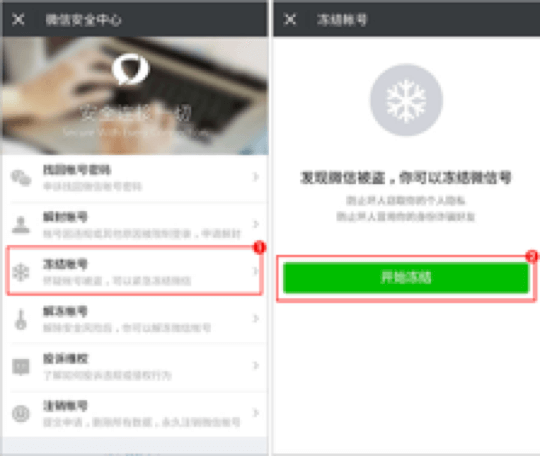
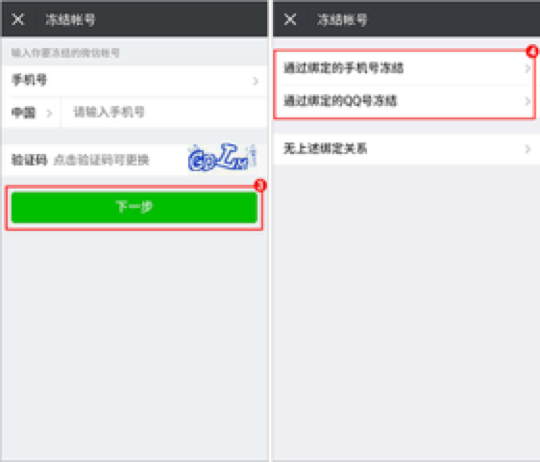
如果是在常用设备,则可以直接一键冻结。If it is deemed as a frequently used log in device by WeChat, you can use “One Click Freeze” feature.
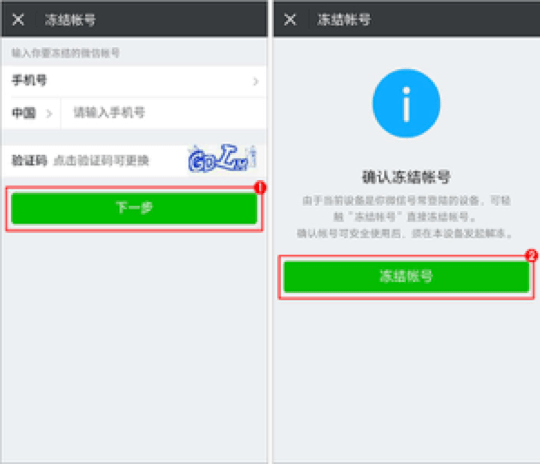
【九】微信号忘记了怎么找回?9. How to retrieve forgotten WeChat ID?
【十】如何设置朋友圈照片查看权限?10. How to manage the permission of viewing the WeChat Moments photos?
关于朋友圈查看权限,有以下几种情况:The followings are permissions that you can manage to set for WeChat Moments:
未设置任何权限No Restrictions
默认公开,你的所有朋友,可以查看到你在朋友圈发表的所有照片。The Default setting is public to all: all of your WeChat friends can review your posts in Moments.
设置回避的人Set “Share to”
发布照片时,可设置“谁可以看”:You can set “Share to” before posting anything on Moments
公开:所有朋友可见;All: all contacts can see;
私密:仅自己可见;Private: just you can see;
部分可见:可根据通讯录分组,选择可见的分组朋友;Share to Just selected contacts: select groups in contacts and only the selected contacts can see;
不给谁看:可根据通讯录分组,选择不可见的分组朋友。Don’t Share: select groups in contacts and the selected contacts will be excluded from reviewing your Moments posts.
允许陌生人查看十张照片Make Last 10 Posts Public
陌生人(附近的人、摇一摇交友场景)只能看到10张最近发的照片。A stranger (people nearby or friends by shaking) can only review the last 10 posts.
朋友圈查看范围:Moments View Permission:
可选择允许朋友查看朋友圈最近三天、最近半年或者全部的内容。You can select “Last 3 days”, “Last 6 months” or “All” to be viewable by friends.
关闭朋友圈插件Disable Moments
之前通过朋友圈发表的照片,可在个人相册里查看。You can still find your photos posted on Moments in your album after you disable Moments.
